Making runes
This is the main authoring guide for rune words, world runes, drawn patterns, and rune-responsive puzzle objects. For a guided first puzzle with screenshots, start with Tutorial: build a rune puzzle.
Before starting
- Sync latest and start an assigned Accretion work item (task code, e.g.
RUNE-005) in a numbered changelist. - Check Rune language and the current rune type matrix.
- Prototype assets in
Content/Developers/<Discipline>/<Name>/. - Coordinate ownership before editing shared assets such as
BP_RephraseCharacter1,DA_RuneDrawingGraph, input mapping contexts, or a shared map.
Every noun and verb on the matrix has a word asset, and every noun carries its matrix row as rules:
- Grammar: one Verb and one Noun in either order
- Result: one command orb, followed by a cleared transaction
- Outcome: the noun's rule for that verb and the object's exact state
System overview
world rune or exact drawn pattern
              |
              v
URuneCoordinatorComponent
              |
              v
FRuneTransaction
(first word pending; second word validates Verb + Noun)
              |
              v
command orb reaches matching objects
              |
              v
URuneableObjectComponent
(noun rule for verb + exact state)
              |
              v
ARunePuzzleActor
(State Looks + Performance)
ARephraseCharacter owns a native URuneCoordinatorComponent. The coordinator handles nearby world runes, drawing input, pending words, grammar, feedback, and command delivery. Puzzle actors receive commands through URuneableObjectComponent.
Shared asset locations
| Asset | Path |
|---|---|
| Noun words | Content/Rephrased/Gameplay/Runes/Nouns/ |
| Verb words | Content/Rephrased/Gameplay/Runes/Verbs/ |
| World-rune Blueprints | Content/Rephrased/Gameplay/Runes/WorldRunes/ |
| Drawing graph | Content/Rephrased/Gameplay/Runes/Drawing/DA_RuneDrawingGraph |
| Puzzle devices | Content/Rephrased/Gameplay/PuzzleDevices/ |
| Drawing widget | Content/Rephrased/UI/WBP_RuneDrawing |
| Glow materials | Content/Rephrased/Art/Materials/ |
| Input actions and contexts | Content/Rephrased/Input/ |
The current nouns, their world runes, and their puzzles are listed in Adding a noun.
1. Create the rune data asset
Create or duplicate a RuneDataAsset under Content/Rephrased/Gameplay/Runes/Nouns/ or Runes/Verbs/.
Set the common fields:
| Field | Purpose |
|---|---|
RuneWord |
Player-facing word. Match the rune matrix exactly. |
EnglishDefinition |
Definition shown under the word above its world rune while the definitions toggle is on. |
WordType |
VERB or NOUN; this drives transaction grammar. |
RuneVisualMesh |
Rune mesh shown on the word's pedestal, as the drawn rune, and on a world rune whose Visual has no mesh of its own. |
For a Noun, fill in the Rules category:
- Default Status: the state a placed object starts in.
- Rules: one row per matrix cell, with Verb, From Status, To Status, and Stops Motion for Freeze.
- Temporary Rules: cells that last a while, such as Rise.
For a Verb, set Duration when it has temporary effects, then add its rows to each noun it affects. A command in a state with no rule rejects with feedback. See Adding a noun and Adding a verb.
2. Create a world rune
Create a Blueprint subclass of AWorldRune and name it BP_RuneWord_<Word>.
Configure:
| Field | Purpose |
|---|---|
RuneData |
The approved rune data asset. |
Origin |
Physical or Environmental for a placed rune. |
InteractionCollision |
Volume overlapped by the player's InteractionTrigger. |
CommandRange |
Radius of the noun's expanding command orb. |
DeactivationRange |
Distance the player may move before a pending world rune clears. |
CandidateGlowMaterial |
Dim selectable-state glow. |
PendingGlowMaterial |
Full activated-state glow. |
Visual |
Mesh/material presentation. |
The viewport range toggles expose the three authored spheres:
- yellow: interaction
- cyan: command
- magenta: deactivation
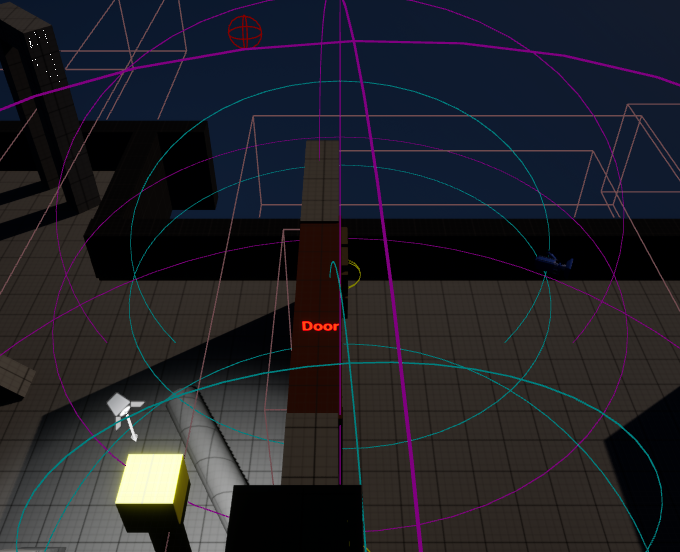
The closest world rune inside the interaction box becomes the candidate. Activating it makes the word pending. Walking outside its deactivation range clears that pending world token.
For a world noun, the command orb begins at the noun rune's visual and uses its CommandRange. Every matching runeable object touched by the expanding edge receives the command once.
3. Add a drawn pattern
Drawing uses the shared URuneDrawingDataAsset at DA_RuneDrawingGraph. The tablet graph, the widget surface, and the pattern authoring tool are documented in Mind drawing.
Each FRunePattern needs:
Runeset to the word's data asset.StrokeIdscontaining the exact shape.- No duplicate stroke ID.
- A unique stroke set that does not match another word.
Matching is exact. Additional active strokes prevent a match.
Design the shape on the shared rune base before you touch the data asset. A Verb needs the whole small-circle outline highlighted, the straight stroke inside the small circle highlighted, and matching big-circle and small-circle angles; nouns are pictographic and must stay distinguishable from that verb signature. The construction rules, the three part systems, and the 45 degree rotation grid are on Rune language, from the Rune Base Design Guide.
Current patterns:
- Open:
L01L02L03L04 - Light:
C02L01L05L06 - Repair:
L05L06L07L08 - Door:
C03andL09throughL16
An exact match turns blue and activates automatically. The first drawn word parks beside the open tablet while the board clears for the second word. Drawing the same parked word again cancels it. Closing the tablet keeps a matched drawn word pending.
Drawing controls
- E: open or close the drawing tablet
- WASD, arrow keys, or left stick: move through the stroke neighbor graph
- Space or the mapped gamepad action: toggle the selected stroke
- F: interact with nearby world objects and activate the current world-rune candidate
IMC_Default carries movement, interaction, reset, and drawing-toggle input. IMC_RuneDrawing is added at a higher priority while the tablet is open and removed when it closes. Input changes belong in the IA_* and IMC_* assets; gameplay code binds actions rather than physical keys.
4. Create the puzzle device
Rune-responsive objects are Blueprint children of ARunePuzzleActor in Content/Rephrased/Gameplay/PuzzleDevices/. Its Puzzle category holds:
| Field | Purpose |
|---|---|
Noun (on RuneableObject) |
The noun whose rules this object follows. |
Status (on RuneableObject) |
Starting state; empty starts in the noun's Default Status. |
| Label Height | Gap between the top of the main mesh and the red noun label. |
| State Looks | One row per state: mesh, materials, hidden, on/off, and transform of each part that changes. |
| Performances | What plays when a rule reaches a state: Animate to Look, Play Cinematic with its Cinematic Sequence, and an optional Behavior such as Move, Rotate, Rise, or Swap Mesh. Every part other than the Cinematic Sequence is a component of the Blueprint. |
| Accepts Drawn Runes | Off for puzzles only world runes can command. |
The Door shows how the pieces fit:
| Command | Result |
|---|---|
| Open or Rotate + Closed Door | -> Open; both play the same open performance |
| Rotate + Open Door | -> Closed |
| Open or Destroy + Open Door | -> Broken + Open |
| Repair + Broken Door | back to Closed or Open, playing the repair sequence |
| Freeze during any movement | stops the door where it is |
| A cell with no rule | rejected with feedback |
One performance plays at a time; Freeze can land in the middle of any action. See Adding a puzzle device for the full recipe.
5. Place and test the content
- Place the rune-responsive object in
LV_2ndPlayableor the assigned room. - Place any world-rune Blueprint used by the puzzle.
- Assign
RuneDataandOriginon each world rune. - Resize noun
CommandRangeto cover the intended receivers. - Confirm each puzzle's
CommandCollisionsits where the command orb can reach it, and set the Cinematic Sequence on any performance that plays one. - Add the word's drawing pattern when drawing is part of the task.
- Test the intended pair in both Verb/Noun orders.
Runtime rules
- The nearest world rune in the interaction box is the candidate.
- A nearby
IInteractableInterfaceactor takes priority over world-rune activation. - Interaction is ignored while the tablet is open or a command orb is active.
- Activating the same token again cancels it. A token includes word, origin, and source actor.
- A pair succeeds only when it contains one Verb and one Noun.
- Verb/Verb and Noun/Noun pairs reject and clear.
- A valid pair keeps its world/drawn presentation active until the orb finishes.
- The command reaches matching
URuneableObjectComponentinstances touched by the orb. - The transaction clears after command dispatch.
Definition of done
- [ ] Word, type, and behavior match the current rune matrix.
- [ ] The noun has a Default Status and one rule per supported matrix cell; its puzzle has a State Looks row per state.
- [ ] Candidate and pending visuals reset correctly.
- [ ] Intended receivers are inside command range and have query collision.
- [ ] Drawn pattern uses a unique exact set of stroke IDs.
- [ ] Verb + Noun works in both orders.
- [ ] Duplicate activation cancels.
- [ ] Same-type pairs produce no command and clear the transaction.
- [ ] Pending world runes clear outside deactivation range.
- [ ] PIE was completed in
LV_2ndPlayableor the assigned room. - [ ]
convention_checkis clean when C++ changed. - [ ]
request_reviewpassed before submission. - [ ] The devlog records the tested words, statuses, and map.
Shared C++ behavior is covered by Rephrased.Rune.PROT001 and Rephrased.Rune.CORE009. Blueprint and map work also needs human PIE evidence.
Source files
Source/Rephrased/RuneDataAsset.hSource/Rephrased/RuneSystem/Activation/WorldRune.hSource/Rephrased/RuneSystem/Activation/RuneCoordinatorComponent.hSource/Rephrased/RuneSystem/Activation/RuneTransaction.hSource/Rephrased/RuneSystem/Drawing/RuneDrawingDataAsset.hSource/Rephrased/RuneSystem/Effects/RuneNounRule.hSource/Rephrased/RuneSystem/Effects/RuneableObjectComponent.hSource/Rephrased/RuneSystem/Effects/RunePuzzleActor.hSource/Rephrased/RuneSystem/Behaviors/
Change history
- 2026-10-02 — Gabriel Li — Performances list Animate to Look, Play Cinematic, and an optional Behavior; the Puzzle table lists Label Height, and the word table states where English Definition and Rune Visual Mesh appear; added a screenshot of a world rune's range spheres (CORE-011).
- 2026-10-01 — Gabriel Li — Replaced Linked Actors with a Cinematic Sequence (CORE-011).
- 2026-09-29 — Gabriel Li — Linked the build-a-rune-puzzle tutorial.
- 2026-09-29 — Gabriel Li — Rewrote word, noun rule, and puzzle device steps for the rule-based puzzle actor; updated Runes folder paths (CORE-009).
- 2026-09-27 — Gabriel Li — Task board migrated from ClickUp to Accretion: the before-start step now names the Accretion work-item task code.
- 2026-09-17 — Gabriel Li — Linked the drawn-pattern step to the new Mind Drawing system reference.
- 2026-09-17 — Gabriel Li — Renamed the guide to Making runes and rewrote it around the shipping character, input contexts, transaction, command orb, runeable object, and status-effect workflow.
- 2026-09-16 — Gabriel Li — Added shared content paths, exact drawing patterns, Set 1 status behavior, and current rune type names.
- 2026-09-16 — Gabriel Li — Dropped
ISP2CommandReceiver. Commands land onURuneableObjectComponent. SP2 type names redirected to shipping Rune names. - 2026-09-16 — Gabriel Li — Shipping pawn starts with drawing unlocked.
ARuneDrawingUnlockActoris optional for later gated maps. - 2026-09-16 — Gabriel Li — Shipping content paths:
Runes/Words,Runes/Data,PuzzleDevices,UI/WBP_RuneDrawing,Art/Materials/MI_RuneGlow_*. C++ lives underRuneSystem/Activation,Drawing,Effects. Drawing unlocks from a placed actor; tablet starts locked. - 2026-09-16 — Gabriel Li — Open, Light, Repair, and Door drawing patterns are authored on
DA_RuneDrawingGraph. Name inference is gone. - 2026-09-16 — Gabriel Li — Door/Light commands go through
URuneableObjectComponentand status tags. Repair clears Broken and keeps Open. Open doors stay in the world with a live command volume. - 2026-09-15 — Gabriel Li — A matched drawn word parks and clears the tablet so a second word can be drawn. The first tablet pattern sits to the right of the open draw panel; the character still shows the rune.
- 2026-09-15 — Gabriel Li — Each world rune has independent viewport toggles for interaction, command, and deactivation range spheres.
- 2026-09-14 — Gabriel Li — Rebuilt the drawing tablet to the 21-stroke C01-L16 graph. Exact sets auto-activate (blue); E opens/closes; F interacts; WASD and left stick walk the neighbor table.
- 2026-09-14 — Gabriel Li — Pending-rune clear distance is now the
DeactivationRangesphere onAWorldRune, same authoring pattern asCommandRange. Default radius stays 800. Viewport colors: yellow interaction, cyan command, magenta deactivation. - 2026-09-10 — Gabriel Li — Added the engineer-facing Second Playable workflow for world runes, drawn patterns, Door/Light receivers, runtime rules, ownership boundaries, and verification.
- 2026-09-10 — Gabriel Li — Corrected the guide after an independent review: world-noun targeting resolution,
ARunePuzzleActorcoverage limits, token-level cancellation, uniqueStrokeIdrequirement, and the known gaps in this slice.