Puzzle rules and behaviors
A rune command changes a puzzle in two steps. The noun's rule decides the gameplay result: which state the puzzle ends in. The placed puzzle's State Looks and Performances decide how that result looks and plays.
Rules decide the result
URuneableObjectComponent::ReceiveCommand:
- checks that
NounRunematches the command Noun; - asks the puzzle's
CanReceiveCommandgate when one is bound; - finds the noun rule for this verb and the exact current state (
URuneDataAsset::ResolveRule); - asks the puzzle's
CanApplyRulegate, e.g. whether another performance is playing; - sets the new state for a permanent rule, and keeps it for a temporary one;
- broadcasts the resolved rule so the puzzle can play it;
- emits rejection feedback when any step says no.
A rule with the same From and To state still plays its performance, so Rotate can turn a Column that stays Normal. A rule with Stops Motion is Freeze.
Puzzles decide the look
ARunePuzzleActor handles the resolved rule:
- Stops Motion stops the playing performance when it moves something.
- When the state changed, the puzzle applies the new state's State Looks row.
- It plays the best-matching Performance for the result.
Performances match on To Status, and optionally on From Status and Specific Verb; the most specific entry wins. A performance with no Specific Verb plays for any verb that changes the state, and never for a verb that keeps it. Rules that reach the same result share one performance, so Rotate and Open on a closed Door play the same swing.
A state the world sets is presented the same way. When a listener or controller calls SetStatus on a puzzle, the puzzle finishes whatever is playing, applies the new state's State Looks row, and plays the best-matching Performance. The change carries no verb, so it matches performances with no Specific Verb; narrow a performance with From Status when it should play for one way of arriving and stay quiet for another. Each such change writes a warning to the log naming the puzzle and both states. A puzzle's starting status and a checkpoint restore snap to the look and play nothing.
One performance plays at a time. Freeze can land in the middle of any action. A performance whose Play Cinematic is playing a Cinematic Sequence keeps playing through Freeze, shot and parts together; validation notes this on every cinematic performance. With no Cinematic Sequence set it only animates, and Freeze stops it.
What a performance plays
Each performance row plays up to three things together. Ticking a checkbox shows its settings.
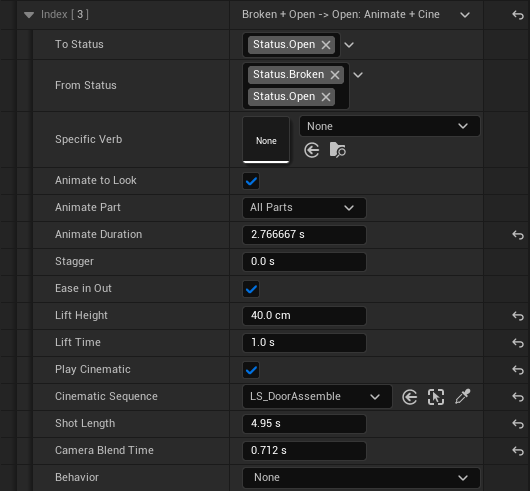
| Setting | What it does | Settings |
|---|---|---|
| Animate to Look | Animates every part from its pose before the change to the new state's look, instead of snapping there. With a Lift Height, each part first rises that far over Lift Time, then flies. Pieces the new look hides stay in view until they land, then the whole mesh takes their place. | Animate Part, Animate Duration, Stagger, Ease in Out, Lift Height, Lift Time |
| Play Cinematic | Plays the row's Cinematic Sequence as the camera shot while the performance runs, such as a repair. With no sequence set, no shot plays. | Cinematic Sequence, Shot Length, Camera Blend Time |
| Behavior | Motion with its own numbers, picked from a dropdown. | See Behaviors below |
Animate Part starts at All Parts, which animates every part the look moves; naming one animates only that part, and the rest snap. Cinematic Sequence is a Level Sequence Actor in the level, so it is set on the placed puzzle.
Behaviors
A performance's Behavior is picked from a dropdown and tuned per placed puzzle. Every behavior has a Target: a component of the puzzle, picked by name. A new behavior starts on the main mesh, the puzzle's first static mesh that is not a broken piece.
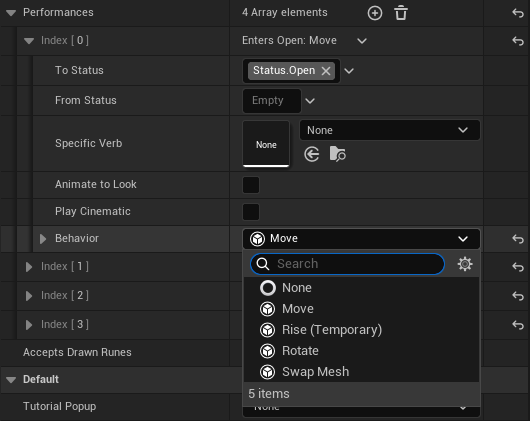
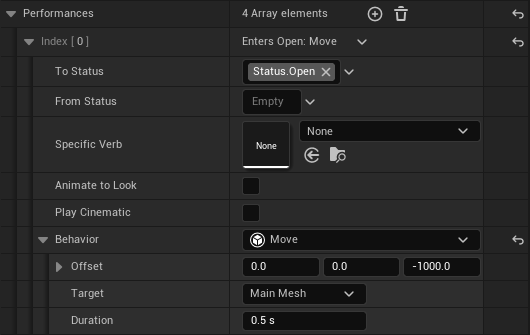
| Behavior | What it does | Settings |
|---|---|---|
| Move | Slides the target by an offset and leaves it there. | Offset, Duration |
| Rotate | Turns the target by a rotation and leaves it there. | Rotation, Duration |
| Rise (Temporary) | Lifts the target, holds, and lowers it again. | Distance, Travel Time, Hold Time |
| Follow Path | Carries the target through a list of points and leaves it at the last one. With Returns ticked it holds there, then travels the path back. | Points (Offset, Rotation, Time, Accelerate), Returns, Hold Time |
| Swap Mesh | Swaps the target's mesh at once; the swap lasts until the next state change. | Mesh |
Rise holds for the Rise verb's Duration unless the placed puzzle ticks Hold Time and sets its own. A Follow Path with Returns ticked holds the same way, so it can play a temporary rule such as Rise.
Follow Path measures each point's Offset and Rotation from where the target was when the path started, in its parent's space. Time is how long the leg to that point takes; a point that repeats the previous one is a pause, such as waiting for a tree to finish growing. Accelerate starts the leg slowly and speeds up, like a fall. To move the whole puzzle, including its CommandCollision so runes still reach it, set the Target to SceneRoot.
Move, Rotate, Rise, Follow Path and Animate to Look move their target, so Freeze stops them where they are. A checkpoint saves the settled pose of moved targets and any swapped mesh; for Rise and a returning Follow Path that is the pose before the motion started.
Linking two puzzles
UPuzzleStatusLinkComponent sets one puzzle's state once another puzzle reaches a state, through SetStatus. Add it to any actor in the level and set Source Puzzle and Source Status (the source must have every tag), then Target Puzzle, Target From Status and Target Status. The target only changes from the exact From state, so a state it reaches later is never undone. It checks once after BeginPlay and again whenever the source's status changes.
In Lvl_Overworld, ColumnPush_Link lodges the ledge column when Tree C grows: Tree C reaching Grown sets the column from Normal to Lodged, and the column's Follow Path carries it off the ledge, down the waterfall and round the channel to the root gate. The tree pushing the column is physical, so this link is a declared P6 exception until the water and tree interaction is detected.
For a spline-grown path pushing a structure, enable Require Path Contact on the link. The source must have a RuneSplinePathComponent; the link waits until its generated spline mesh collision overlaps a collision-enabled static mesh on the target. Command/selection volumes do not count. The path broadcasts geometry changes during extension and checkpoint restoration, and the link rechecks after those events without polling. Freeze before contact leaves the target standing; a path that misses never triggers it. Existing authored state links keep this option off. After a native rebuild, enable it on the TreeBridge_Link in the Sophie test level to replace that prototype's immediate state trigger.
Creating a new behavior
Create a C++ or Blueprint subclass of URunePuzzleBehavior. It is EditInlineNew, so it appears in the Behavior dropdown on every performance.
- C++: override
Start,Update(Alpha),Finish,Stop, andGetTotalTimeas needed, and return true fromMovesObjectwhen Freeze should stop it. - Blueprint: implement
OnBegin,OnUpdate, andOnComplete, and useGetPuzzleto reach the puzzle.
See Adding a verb for the full recipe.
Source files
Source/Rephrased/RuneDataAsset.hSource/Rephrased/RuneSystem/Effects/RuneNounRule.hSource/Rephrased/RuneSystem/Effects/RuneableObjectComponent.hSource/Rephrased/RuneSystem/Effects/RunePuzzleActor.hSource/Rephrased/RuneSystem/Behaviors/Source/Rephrased/RuneSystem/Puzzles/PuzzleStatusLinkComponent.h
Change history
- 2026-10-20 — Sriya — Added optional spline-path contact detection to status links, with Freeze and checkpoint coverage.
- 2026-10-18 — Ricky Lu — Added the Follow Path behavior and
UPuzzleStatusLinkComponent, used for the ledge column inLvl_Overworld(CT-004). - 2026-10-06 — Gabriel Li — A state set with
SetStatusplays the matching Performance and logs a warning. - 2026-10-05 — Gabriel Li — Behavior Targets name each component, the main mesh included (CORE-011).
- 2026-10-02 — Gabriel Li — Performances narrow by Specific Verb, Targets name the Main Mesh, Animate Part starts at All Parts, Rise has a Hold Time, and Animate to Look and Play Cinematic are checkboxes on each performance with the Cinematic Sequence in the row. Described the lift, the piece swap on landing, and Play Sequence blending during the shot; added editor screenshots (CORE-011).
- 2026-10-01 — Gabriel Li — Described Play Sequence with a Cinematic Sequence and its Blend To Look fallback (CORE-011).
- 2026-09-29 — Gabriel Li — Rewrote the page around noun rules, State Looks, Performances, and puzzle behaviors (CORE-009).
- 2026-09-17 — Gabriel Li — Updated the page for one-shot Verb effects, noun overrides, status transitions, and runeable-object delivery.
- 2026-09-05 — Gabriel Li — Updated to the shipped hybrid Content structure (PR #19): PreProShowcase sandbox under
Content/Rephrased/Levels/Prepro/, Art/Gameplay/Levels layout, Imports isolation,Content/Developers/<Discipline>/<Name>/scratch space. - 2026-05-23 — Gabriel Li — BP subclass assignment note for data asset Details panel.