Adding a puzzle device
A puzzle device is a Blueprint child of ARunePuzzleActor in Content/Rephrased/Gameplay/PuzzleDevices/. The noun's rules decide what each command does; the puzzle decides how each state looks and what plays on the way there. Most devices are Blueprint-only.
What the base class gives you
ARunePuzzleActor comes with:
RuneableObject: the Noun and starting StatusCommandCollision: the query box the command orb overlapsSaveIdComponent: the identity checkpoints save the puzzle's state byNounLabel: the red noun word shown in the G debug view, Label Height above the top of the main mesh- the Puzzle category: State Looks, Performances, and Accepts Drawn Runes
Recipe
1. Create the Blueprint
- Create a Blueprint class with parent
RunePuzzleActorinContent/Rephrased/Gameplay/PuzzleDevices/, namedBP_Puzzle_<Noun>. - Add every part the device needs as a component of the Blueprint: meshes, lights, Niagara, a hinge scene component for anything that swings. Name each part for what it is, such as
BulborBrokenPiece1; those names fill the Target dropdowns. - On
RuneableObject, set Noun. Leave Status empty so placed copies start in the noun's Default Status. - Size
CommandCollisionaround the part of the device the command orb should reach.
2. State Looks
Add one State Looks row per state in the noun's States list. Each row lists the parts that change in that state:
| Field | Meaning |
|---|---|
| Target | A component of the Blueprint, picked by name from a dropdown. A new part starts on the main mesh: the puzzle's first static mesh that is not a broken piece. |
| Swap Mesh, Swap Materials | Replace the target's mesh or material slots in this state; empty keeps the current one. |
| Hidden | Hides the target and turns its collision off, e.g. a broken door the player walks through. |
| Active | On, Off, or Unchanged: lights, Niagara, or any component. |
| Offset, Rotation, Scale | Where the target sits in this state, measured from its authored pose. Keep Base scales from the bottom of the mesh. |
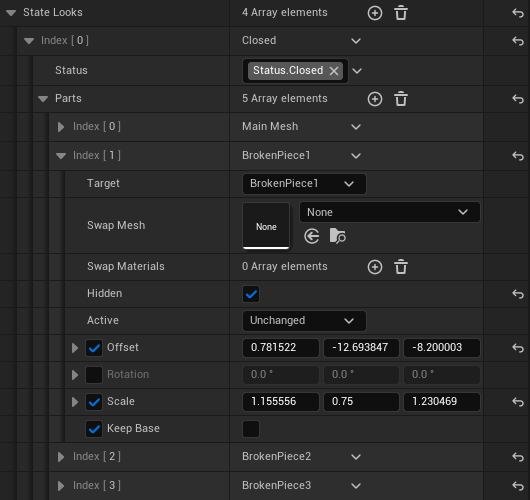
A part that targets a broken piece (BrokenPiece1, BrokenPiece2, and so on) poses the piece by itself. In a Broken state the piece keeps the pose it is placed in; in every other state it sits on the mesh named in its Fixes Into, wherever that mesh sits in that state. An empty Fixes Into is the main mesh. An Animate to Look performance flies it between the two.
Pieces that fix into the same mesh are fitted onto it together: the box they fill between them lands on the mesh's own box, so they cover it exactly whatever their size and pivot. A double door sets Fixes Into on two pieces to one leaf and on the other two to the second leaf, in the Closed and Open looks; each pair then closes and swings with its leaf. Pieces take the rotation of the mesh they fix into, so a mirrored part, like the second leaf, uses its own mirrored mesh or a negative scale on one axis; a copy turned half a turn makes its pieces turn half a turn to land. Offset, Rotation, and Scale on a piece in a state that is not Broken nudge it from where it lands.
A checkpoint restore and every state change snap the puzzle to its state's row.
A placed puzzle shows its starting state in the level editor: the row for its Status, or for the noun's Default Status when Status is empty. Hidden parts are hidden, and lights follow Active, so a light that starts off is dark in the editor. A mesh the row moves, rotates, scales, or swaps shows the way the game poses it, so a door that starts Open stands open in the level. The preview draws that pose with a stand-in mesh and leaves the component where it was placed; lights and other parts attached under a moved mesh stay at their placed position until the game starts.
3. Performances
Add a Performances entry for each result that should play something:
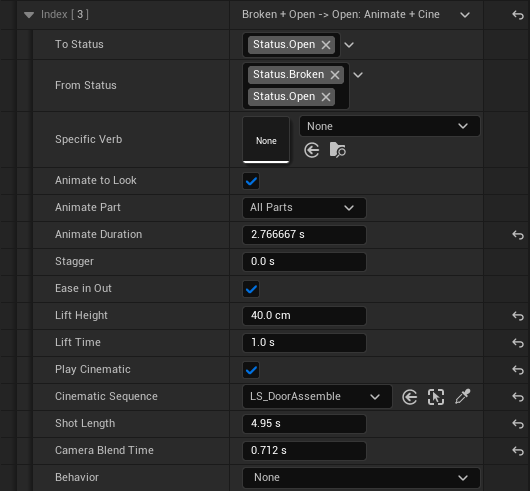
- To Status, optionally narrowed by From Status or Specific Verb
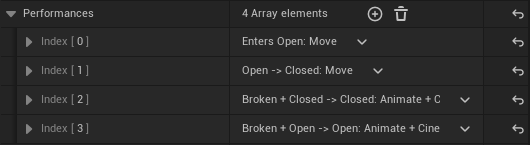
- Animate to Look: animates the parts from the old state's look into the new one, with its duration, stagger, and lift
- Play Cinematic: plays a Level Sequence as the camera shot, with its Cinematic Sequence, Shot Length, and Camera Blend Time
- Behavior: optionally Move, Rotate, Rise (Temporary), or Swap Mesh, with its settings
Ticking a checkbox shows its settings. Rows title themselves, e.g. Closed -> Open: Animate. A state with transform looks usually wants Animate to Look. See Puzzle rules and behaviors for every setting.
4. Parts and cinematics
Every part of a device is a component of its Blueprint, so a placed copy needs nothing linked in the level. BP_Puzzle_Light carries a Bulb light and BrokenPiece1 to BrokenPiece4; BP_Puzzle_Door carries BrokenPiece1 to BrokenPiece4. A breakable device keeps its broken pieces as components. A piece lies wherever it is placed, the Broken look keeps it there, and the repair performance flies it back onto the main mesh.
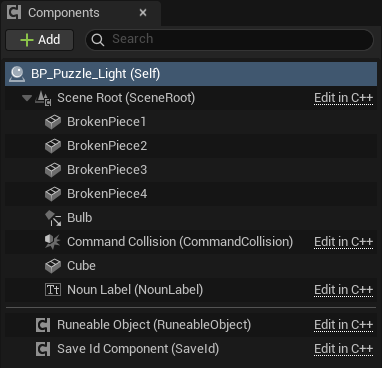
To add a part, add a component to the Blueprint and pick it by name as a Target in State Looks and Performances.
Modeled debris goes in the same piece components. Give each piece its mesh, place it where it lies when broken, and set its parts like this:
- Broken rows: a part on each piece, and Hidden on the main mesh.
- Every other row: a part on each piece with Hidden ticked, so the whole mesh shows. On repair the pieces stay in view until they land, then the whole mesh takes their place.
A device that plays a cinematic on repair ticks Play Cinematic on the repair performance. Its one level reference is that row's Cinematic Sequence, the Level Sequence Actor to play, set on the placed copy. The sequence carries only its camera. With Animate to Look ticked the parts blend to the new look while the shot plays, and a row with no Cinematic Sequence blends them with no shot, so the same performance serves both.
What the extra components are for
| Component | On | What it does |
|---|---|---|
Bulb |
BP_Puzzle_Light |
The light the puzzle switches. A State Looks part sets Active to On or Off. |
BrokenPiece1 to BrokenPiece4 |
BP_Puzzle_Light, BP_Puzzle_Door |
The debris of a break. A broken state leaves each piece where it is placed, and a repair flies it onto the main mesh. |
Any puzzle can get the four pieces with the button below.
Break a mesh into pieces (prototype)
A placed puzzle can cut its own mesh into four pieces, so a prototype breaks and repairs without any modeled debris. Select one placed puzzle and press Break Mesh Into 4 Pieces in its Puzzle category.
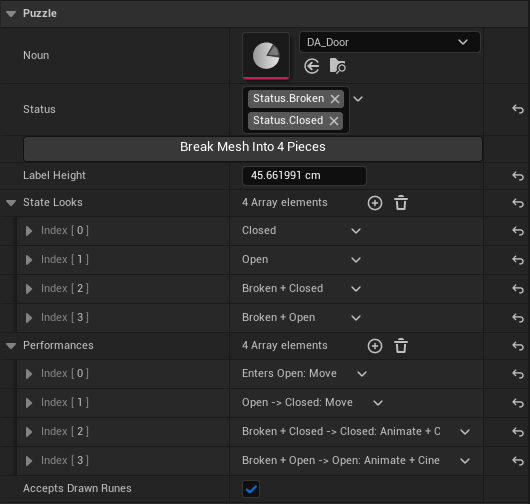
- The puzzle's main mesh, its first Static Mesh component that is not a
BrokenPiece, is cut across its two longest axes through the centre of its bounds. Each cut has a closed face, and together the four pieces are the original mesh. - Four mesh assets named
<Mesh>_Piece1to<Mesh>_Piece4are created in aPiecesfolder next to the source mesh, or inContent/Rephrased/Gameplay/PuzzleDevices/Pieceswhen the source is an engine mesh. Save them with the level, then add them to the changelist. BrokenPiece1toBrokenPiece4take the new meshes and the main mesh's materials, placement, and collision. A puzzle without these components gets them on the placed copy.- The pieces start scattered outward from the cut with a tilt. That placement is the broken pose.
- Every State Looks row gets a part for the whole mesh and one for each piece. A Broken row hides the whole mesh and shows the pieces where they are placed. Every other row shows the whole mesh and hides the pieces, so a performance that moves the main mesh is seen, and the repair performance flies the pieces together before the whole mesh takes their place.
- Pressing the button again replaces the piece parts and cuts again, with new assets, and scatters the pieces afresh.
The button works on a placed puzzle, not on a Blueprint's Class Defaults. To shape the break, set the puzzle's Status on its RuneableObject component to a broken state. The editor then shows the pieces where they lie and hides the whole mesh, and moving or rotating a piece sets its broken pose. A state that is not broken shows the whole mesh. The repair reads each piece's pose, so no offsets need tuning. A finished device uses modeled broken meshes in the same BrokenPiece components.
5. Place and tune
Place the Blueprint in your playground. Each placed puzzle can override its State Looks and Performances, so two Doors can swing differently while following the same rules. Turn Accepts Drawn Runes off for puzzles only world runes should command.
A new C++ puzzle class
Derive from ARunePuzzleActor when a device needs native logic beyond looks and performances. Bind to RuneableObject->OnRuleAppliedNative to react to each applied rule, and keep state changes in the noun's rules so rejection feedback, saves, and looks stay consistent. For a new kind of motion, add a behavior instead; see Adding a verb.
Verifying your work
- Place the device and a matching Verb + Noun rune pair in your playground.
- Activate both words. The command orb reaches the device and logs
RuneCoordinator: command orb reached <label>. - Confirm the state change, the performance, and the settled look.
- Send Freeze mid-performance. Movement stops where it is.
- Send a command the current state has no rule for. The command rejects with feedback.
- Press G. The red noun label floats above the device.
- Save at a checkpoint, reload, and confirm the device restores its state and pose.
- Run data validation on the Blueprint and on placed copies.
Source files
Source/Rephrased/RuneSystem/Effects/RunePuzzleActor.h— the puzzle base classSource/Rephrased/RuneSystem/Effects/RuneableObjectComponent.h— noun, status, and command entry pointSource/Rephrased/RuneSystem/Behaviors/— performance behaviorsSource/Rephrased/RuneSystem/Effects/RuneStatusTags.h— nativeStatus.*tags
Change history
- 2026-10-07 — Gabriel Li — Fixes Into on a broken piece's look part, and pieces fitted onto the mesh they fix into.
- 2026-10-05 — Gabriel Li — Target fields name each component, the main mesh included; the level editor shows a starting state's moved and swapped meshes (CORE-011).
- 2026-10-02 — Gabriel Li — Documented the Break Mesh Into 4 Pieces prototype tool, the Piece Pose look setting and placing broken pieces in the level, modeled debris in the piece components, the camera-only Cinematic Sequence, and the starting-state preview of placed puzzles in the level editor; renamed the broken piece components to BrokenPiece1 to BrokenPiece4 throughout. State Looks name the main mesh as Main Mesh in the Target dropdown and label their mesh and material fields Swap Mesh and Swap Materials, Label Height is measured from the top of the main mesh, performances carry Animate to Look and Play Cinematic checkboxes with the Cinematic Sequence in the performance row and narrow by Specific Verb, and broken pieces pose themselves from the state; added editor screenshots (CORE-011).
- 2026-10-01 — Gabriel Li — Replaced Linked Actors with Blueprint components and an optional Cinematic Sequence (CORE-011).
- 2026-09-29 — Gabriel Li — Rewrote the recipe around
ARunePuzzleActorBlueprints: State Looks, Performances, and Linked Actors (CORE-009). - 2026-09-17 — Gabriel Li — Rewrote the recipe around
URuneableObjectComponent, command-orb collision, status-driven presentation, andCanReceiveCommand;ARunePuzzleActoris the worked example. - 2026-09-05 — Gabriel Li — Updated to the shipped hybrid Content structure (PR #19): PreProShowcase sandbox under
Content/Rephrased/Levels/Prepro/, Art/Gameplay/Levels layout, Imports isolation,Content/Developers/<Discipline>/<Name>/scratch space. - 2026-05-23 — Gabriel Li — Designer vs engineer routing callout at top.