Data assets
Data assets store authored values in .uasset files. Designers can add words and drawing patterns without changing C++ when existing behavior classes are sufficient.
When to use a data asset
Use a data asset for content that shares one schema and varies by values: rune words, drawing patterns, tables, and tuning sets. Use a Blueprint or C++ class when behavior changes.
URuneDataAsset
One asset defines one rune word.
Common fields:
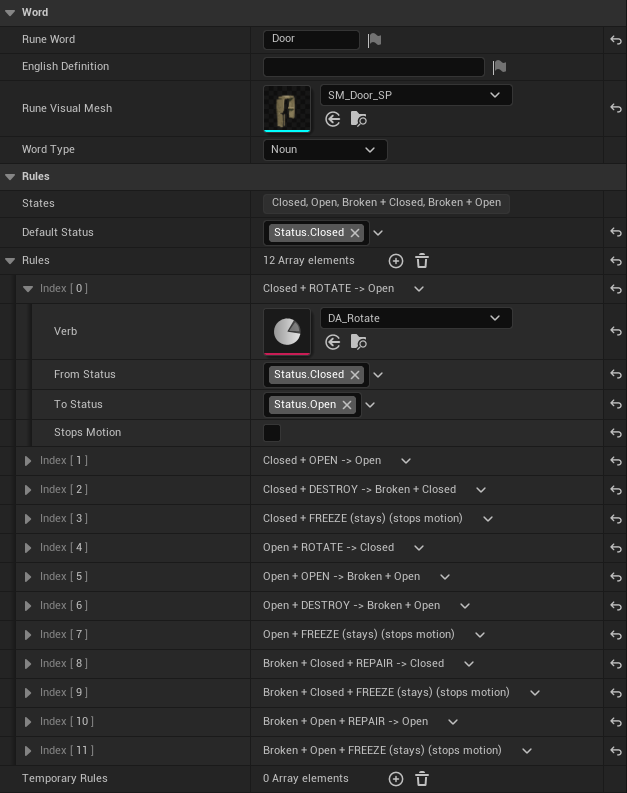
RuneWord: player-facing wordEnglishDefinition: definition text, shown under the word above its world rune while the definitions toggle is onRuneVisualMesh: word mesh shown on its pedestal, as the drawn rune, and on a world rune whose Visual has no mesh of its ownWordType:NOUNorVERB
Noun fields, under Rules:
- Default Status: the state a placed object starts in
- Rules: one row per matrix cell (Verb, From Status, To Status, Stops Motion)
- Temporary Rules: cells that last a while, such as Rise
- States: read-only list of every state the rules use
Verb field, under Verb:
- Duration: how long the verb's temporary effects last
WordType drives field visibility in the Details panel. A noun holds its whole row of the effects matrix; a verb is the word itself plus its Duration.
URuneDrawingDataAsset
DA_RuneDrawingGraph contains exact FRunePattern rows:
Rune: word data assetStrokeIds: exact unique stroke set
This shared binary asset should have one editor at a time.
Creating a rune data asset
- In the Content Browser, right-click and choose Miscellaneous → Data Asset.
- Select
RuneDataAsset. - Create it under
Content/Rephrased/Gameplay/Runes/Nouns/orRunes/Verbs/, or in a personal developer folder. - Set the common fields and the fields shown for its
WordType. - Save and verify it through the Making runes workflow.
The Door, for example, is Runes/Nouns/DA_Door and the Open verb is Runes/Verbs/DA_Open.
References from C++
Hard reference:
Soft reference:
UPROPERTY(EditAnywhere, BlueprintReadWrite, Category = "Rune")
TSoftObjectPtr<URuneDataAsset> RuneData;
Rune definitions are small and commonly use hard references. Use soft references when asset loading must be deferred.
Safe editing
- Use Reference Viewer before deleting or replacing a data asset.
- Move and rename assets through Unreal so redirectors can be fixed.
- Coordinate ownership for shared data assets.
- A command in a state with no rule rejects with feedback; two rows for the same cell show up in data validation.
- A placed object's status is filtered to the tags its noun's states use.
Source files
Source/Rephrased/RuneDataAsset.hSource/Rephrased/RuneSystem/Drawing/RuneDrawingDataAsset.h
Change history
- 2026-10-02 — Gabriel Li — English Definition and Rune Visual Mesh say where the game shows them; added editor screenshots (CORE-011).
- 2026-09-29 — Gabriel Li — Documented noun rules, Default Status, and verb Duration; updated Runes folder paths (CORE-009).
- 2026-09-17 — Gabriel Li — Updated rune data fields for Verb effect classes, noun overrides, allowed statuses, and exact drawing patterns.
- 2026-05-23 — Gabriel Li — Moved under Rephrased project track.
- 2026-05-08 — Gabriel Li — Added baseline change history section for weekly wiki maintenance.