Enhanced Input in Rephrased
Rephrased routes gameplay input through Enhanced Input actions and mapping contexts. Physical keys belong in IMC_* assets; C++ and Blueprints bind IA_* actions.
For the engine concepts, see Enhanced Input overview.
The input rework tracked as CORE-007 is in progress. This page documents the verified current state as of 2026-09-19 so UI engineers can wire against what exists today.
Input assets
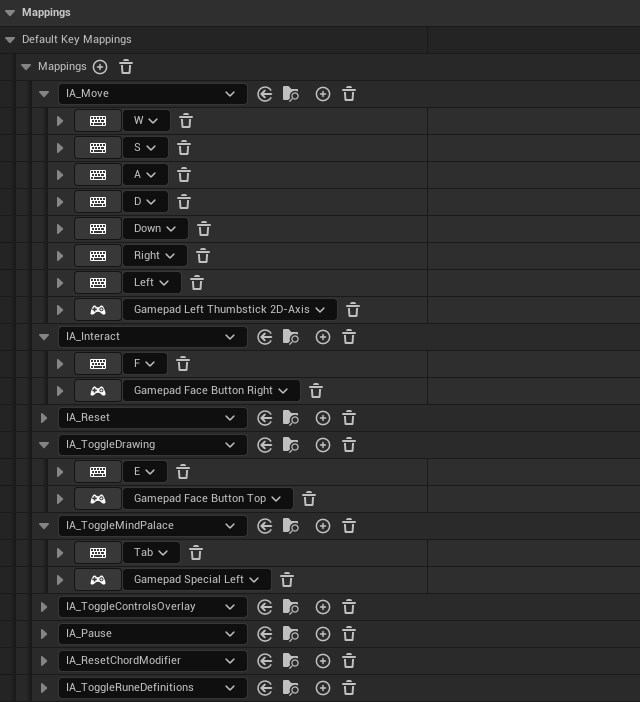
Shared assets live in Content/Rephrased/Input/. IMC_Default and IMC_RuneDrawing carry gamepad rows alongside keyboard rows; the key mappings below are read from the live assets.
IMC_Default
Active during normal gameplay at priority 0. ARephraseCharacter adds it to the local player's subsystem at BeginPlay.
| Action | Keyboard | Gamepad |
|---|---|---|
IA_Move |
W / S / A / D, Left / Right / Down | Left stick (Gamepad_Left2D) |
IA_Interact |
F | Face button right |
IA_Reset |
R | Hold right stick click while left stick click (IA_ResetChordModifier) is held |
IA_ToggleDrawing |
E | Face button top |
IA_ToggleMindPalace |
Tab | Special left |
IA_ToggleControlsOverlay |
C | Face button bottom |
IA_Pause |
P (Escape stops Play In Editor) | Special right |
Known gap in this context: IA_Move has no Up-arrow row. IA_ToggleControlsOverlay, IA_Pause, and IA_ResetChordModifier have rows here, but nothing under Source/ binds them.
IMC_RuneDrawing
URuneCoordinatorComponent::AddDrawingMappingContext adds it while Mind Drawing is open, above IMC_Default. ARuneDrawFloor::Open (Source/Rephrased/RuneSystem/Drawing/RuneDrawFloor.cpp) binds the floor actions; BP_RuneDrawFloor assigns the action assets.
| Action | Keyboard | Gamepad | Trigger | Handler |
|---|---|---|---|---|
IA_RuneDrawAim (Axis2D) |
— | Left stick (Gamepad_Left2D) |
— | ARuneDrawFloor::HandleAimPath on Triggered and Completed, choosing through PickAimedOption (dead zone 0.65, AimDeadzone). In Controller B, while LT is held, the stick picks a socket instead (see IA_RuneDrawSocketTrigger). |
IA_CycleRuneStrokes |
A / D (A negated) | — | Pressed | ARuneDrawFloor::HandleSelectPath on Started: previous / next path at the socket |
IA_RuneDrawTapStroke |
W | A (Gamepad_FaceButton_Bottom) |
— | HandleTapDraw on Started: draws the selected stroke in TapStrokeSeconds (0.1 s) and stops at its end. With LB or RB already held, it turns the base 45 degrees instead and draws nothing; both bumpers held, nothing. |
IA_RuneDrawUndo |
S | X (Gamepad_FaceButton_Left) |
— | HandleUndoStarted / HandleUndoReleased: held, reverses the stroke in progress; a press at rest undoes the last finished stroke |
IA_RuneDrawSocketModifier |
Left Shift, Right Shift | — | — | Held: shows each socket key's letter on the floor at the socket it leads to |
IA_RuneDrawSocketQ ... IA_RuneDrawSocketC (nine actions) |
Shift + Q W E / A S D / Z X C | — | Chorded Action on IA_RuneDrawSocketModifier |
HandleSocketKey: slides the pen to another socket in SocketMoveSeconds (0.1 s) without ink, keeping the ink and the undo history. Drawing A (Rephrased.Drawing.SocketControls 0): W, A, S, D step one socket up, left, down, right in the 3 x 3 layout and stop at the edges. Drawing B (1): each key goes to the socket in its place in the block, S is the center; the current socket's key does nothing. The pause menu's Debug panel switches A and B. |
IA_RuneDrawRotateModifier |
Left Ctrl, Right Ctrl | — | — | Held for IA_RuneDrawRotateBase; with Shift also held neither does anything |
IA_RuneDrawRotateBase (Axis1D) |
Ctrl + A / D (A negated) | — | Chorded Action on IA_RuneDrawRotateModifier |
HandleRotateBase: turns an empty, settled base 45 degrees counter-clockwise / clockwise |
IA_RuneDrawSubmit |
F | B (Gamepad_FaceButton_Right) |
— | HandleSubmit |
IA_RuneDrawTurnLeft / IA_RuneDrawTurnRight |
— | LB / RB | — | held flags read by HandleTapDraw |
IA_RuneDrawSocketStick (Axis2D) |
— | Right stick (Gamepad_Right2D) |
— | HandleSocketStick, Controller A (Rephrased.Drawing.ControllerSocketControls 0): a tilt past 0.4 hops the pen one socket that way on screen without ink, eight ways, stopping at the edge; the stick re-arms below 0.28 |
IA_RuneDrawSocketTrigger |
— | LT (Gamepad_LeftTrigger) |
— | HandleSocketTriggerPressed / HandleSocketTriggerReleased, Controller B (1): a fresh press with the left stick neutral goes to the center; while held, each new left-stick direction goes to that outer socket, neutral keeps the pen there |
IA_ToggleDrawing |
E | — | — (the action has a Down trigger) | URuneCoordinatorComponent::HandleToggleDrawingInput: closes Mind Drawing; the gamepad opens and closes it with Y through IMC_Default |
Opening and closing Mind Drawing is the IMC_Default row: E or Y. RT and the D-pad have no drawing action. After the game window regains focus or a controller connects or disconnects, drawing presses wait until every drawing input has been released, so nothing held through the change replays.
IMC_MouseLook
The asset exists but carries no mappings. Mouse look is not wired through a mapping context today.
IMC_MindPalace and IMC_StarView
ARephraseCharacter adds its MindPalaceMappingContext at priority 0 only while it is possessed in a level that contains an ARuneStarField, so the star view key does nothing anywhere else. ARuneStarField adds its StarViewMappingContext while the star view is open, at StarViewMappingPriority (default 1), above the default context so the navigate keys never also reach movement.
| Context | Action | Keyboard | Gamepad | Handler |
|---|---|---|---|---|
IMC_MindPalace (0) |
IA_ToggleStarView |
Q | — | ToggleStarView |
IMC_StarViewStick (0), built at runtime |
IA_StarViewStick (Axis1D) |
— | Right stick up opens, down closes | HandleStarViewStick |
IMC_StarView |
IA_StarNavigate |
W / A / S / D, arrow keys | Left stick | NavigateStars, one step per push |
IMC_StarView |
IA_StarSelect |
Space | Cross | SelectStar calls ARuneStarField::ConfirmStar: sends the player to that rune's pedestal and leaves the star view |
IMC_StarView |
IA_StarClick |
Left mouse button | — | ClickStar |
ARephraseCharacter::BuildStarViewStickInput creates IMC_StarViewStick and its action at runtime, and NotifyControllerChanged adds it with MindPalaceMappingContext, so the right stick does nothing outside the Mind Palace. A push past 0.7 toggles once; the stick re-arms when it returns to centre. Up only opens and down only closes. The rune orbital's input is unbound in the Mind Palace, so its right-stick aim never competes.
Unbound actions
These IA_* assets exist under Content/Rephrased/Input/Actions/ but are not referenced by any mapping context or C++ binding: IA_Look, IA_MouseLook, IA_ScrollLook, IA_ToggleCamera, IA_DebugView. Treat them as not-yet-wired, not as features.
Character bindings
ARephraseCharacter exposes:
UInputMappingContext* DefaultMappingContext;
UInputAction* MoveAction;
UInputAction* InteractAction;
UInputAction* ResetAction;
UInputAction* ToggleMindPalaceAction;
UInputMappingContext* MindPalaceMappingContext;
UInputAction* ToggleStarViewAction;
UInputAction* NavigateStarAction;
UInputAction* SelectStarAction;
UInputAction* ClickStarAction;
In SetupPlayerInputComponent, Move and NavigateStar use Triggered (held); Interact, Reset, ToggleMindPalace, ToggleStarView, SelectStar, and ClickStar use Started so a press fires once.
Rune coordinator bindings
URuneCoordinatorComponent exposes:
UInputAction* ToggleDrawingAction;
UInputAction* NavigateDrawingAction;
UInputAction* TogglePrimitiveAction;
The coordinator binds through the possessed player's UEnhancedInputComponent, removes those binding handles when possession changes or rune interaction is disabled, and restores them for the new controller. ToggleDrawingAction and TogglePrimitiveAction use Started; NavigateDrawingAction uses Triggered with a pulse trigger in the mapping asset so held directions step predictably.
IMC_RuneDrawing is added when Mind Drawing opens and removed when it closes.
Rune orbital bindings
The rune orbital's keys live in IMC_OrbitalClosed and IMC_OrbitalOpen (Content/Rephrased/Input/), with their actions under Content/Rephrased/Input/Actions/. UOrbitSatelliteComponent references them under Orbit|Input. BindInput binds the handlers and adds IMC_OrbitalClosed; IMC_OrbitalOpen is present only while the selection is open, not while the orbital shows itself after a Mind Drawing visit. The rune orbital opens only outside Mind Drawing. Its open keys (Q, X) sit in IMC_OrbitalClosed, a context above IMC_RuneDrawing, and HandleDrawingOpenChanged removes that context while Mind Drawing is open and adds it back when it closes, so inside Mind Drawing X is Undo and Shift + Q reaches the northwest socket. ActivateOrbital also does nothing while the stored runes are over the draw floor, and the storage display there is unchanged.
The selection rules are Orbital A or Orbital B (SelectionVariant, switched in play from the pause menu's Debug panel), and the one switch sets both the keyboard and the controller scheme. The three stored runes hold fixed places round the player as the camera sees them: socket 1 left, 2 top, 3 right. Two runes are held at most, one per hand, and they stay held when the selection closes. A full hand is spent as one sentence through URuneCoordinatorComponent::ActivateDrawnSentence, which commands what in range matches it and blinks a pair that makes no sentence; the hands then empty and the stored runes stay. In Orbital A the pair is spent the moment both runes are in hand. In Orbital B it waits for the next IA_Interact (F, or the right face button): ARephraseCharacter::Interact calls FlickHeldRune, which spends a full hand and flicks a lone rune. The open selection never times out.
| Action | Context (priority) | Keyboard | Gamepad | Handler |
|---|---|---|---|---|
IA_OrbitalOpen |
IMC_OrbitalClosed (5), while the pawn is possessed and Mind Drawing is closed |
Q | Face button left (Xbox X, Square) | HandleOpenInput calls ActivateOrbital: opens or closes the selection. Opening in Orbital A keeps the held runes and previews nothing; in Orbital B it releases them and starts an empty pending set. Closing discards the preview or the pending set. |
IA_OrbitalSocket1 / 2 / 3 |
IMC_OrbitalOpen (6), only while the selection is open |
A / W / D | — | HandleSocketPressed calls SelectSocket: Orbital A previews the rune, Orbital B toggles it in the pending set (a third is rejected) |
IA_OrbitalConfirm |
IMC_OrbitalOpen (6) |
F | Face button right (Xbox B, Circle) | HandleConfirmInput calls ConfirmOrbital: Orbital A adds the previewed rune to the right hand (the oldest leaves when both hands are full) or removes it if held, and stays open; Orbital B equips the pending set, first left and second right, and closes. A press in the same frame as IA_OrbitalOpen does nothing. |
IA_OrbitalAim (Axis2D) |
IMC_OrbitalOpen (6) |
— | Left stick | Read each frame by UpdateControllerGestures in Orbital A: once the stick has been at neutral since opening, a tilt of 0.5 or more left, up or right previews socket 1, 2 or 3; it lets go at 0.3, and a held direction never repeats. Down previews nothing. While the selection is open the left stick does not move the player, in either scheme. |
IA_OrbitalDPadLeft / Up / Right / Down |
IMC_OrbitalOpen (6) |
— | D-pad | Read each frame by UpdateControllerGestures in Orbital B: a fresh left, up or right press toggles socket 1, 2 or 3. Down, two directions at once, and any press before the whole D-pad is released do nothing. |
IA_OrbitalCancel |
IMC_OrbitalOpen (6) |
Y | — | HandleCancelInput calls CancelOrbital, which closes the selection as Q does |
FRuneOrbitalControllerGestures (Source/Rephrased/RuneOrbitalModel.h) holds the stick and D-pad rules. Opening and closing reset it, so a stick or D-pad already held never chooses. When the application regains focus or a controller connects or disconnects, ResetHeldInput resets it and rebuilds the mappings with every held key ignored until its release, so nothing replays.
Both orbital contexts sit above IMC_Default, so while the selection is open A/W/D and the left stick do not move the player, F does not interact, and the right face button confirms instead of firing IA_Interact.
God Mode flight keys
While God Mode is on (pause menu, Debug panel), URephrasedDebugSubsystem reads these keys directly each frame. They are not in any IMC_* asset and do nothing outside God Mode.
| Movement | Keyboard | Gamepad |
|---|---|---|
| Rise | Space | Right shoulder |
| Descend | Left Ctrl | Left trigger |
Editing input safely
- Create or edit the
IA_*asset underContent/Rephrased/Input/Actions/. - Add the physical binding to the correct
IMC_*asset. - Assign action/context references on
BP_RephraseCharacter1or its nativeRuneCoordinatorcomponent. - Keep one owner for each shared binary input asset.
- PIE with keyboard and a supported gamepad before submitting.
Add code only when the action needs a new gameplay handler. Remapping a key belongs in the input assets.
Gamepad support
Windows gamepads use Game Input through GameInputWindows. Xbox-style pads and DualSense map to Unreal's Gamepad_* inputs. XInputDevice is disabled to prevent duplicate Xbox input. Windows processes the gamepad device kind; Raw Input is not used for gameplay controls.
On a DualSense, face button bottom, right, left, and top are Cross, Circle, Square, and Triangle; the shoulders are L1 and R1 and the triggers L2 and R2.
Current verified gamepad coverage:
- Left stick:
IA_Move(gameplay); in Mind Drawing, point to choose a path (IA_RuneDrawAim), or with LT held in Controller B, pick a socket; preview a rune while Orbital A is open - Face button bottom (A):
IA_ToggleControlsOverlay(gameplay), draw one stroke (Mind Drawing) - Face button right (B):
IA_Interact(gameplay), submit (Mind Drawing), and confirm (rune orbital) - Face button left (X): open and close the rune orbital (gameplay), undo (Mind Drawing)
- Face button top (Y):
IA_ToggleDrawing, opens and closes Mind Drawing - D-pad: toggle a rune while Orbital B is open
- Special left:
IA_ToggleMindPalace; special right:IA_Pause - Left and right stick clicks held together:
IA_Reset - Right shoulder and left trigger: God Mode rise and descend (read directly, see above)
- Right stick: in Mind Drawing, Controller A socket hops; in the Mind Palace, up opens the star view and down closes it
- LT: in Mind Drawing, Controller B socket picks; LB and RB held, then A: turn the base (Mind Drawing)
No right-stick look is wired. Touchpad position is not part of the tablet input contract; the touch assets under Content/Rephrased/Input/Touch/ are UI-only.
Source files
Source/Rephrased/RephraseCharacter.hSource/Rephrased/RephraseCharacter.cppSource/Rephrased/RuneSystem/Activation/RuneCoordinatorComponent.hSource/Rephrased/RuneSystem/Activation/RuneCoordinatorComponent.cppSource/Rephrased/RuneStarField.hSource/Rephrased/Debug/RephrasedDebugSubsystem.cppSource/Rephrased/OrbitSatelliteComponent.hSource/Rephrased/OrbitSatelliteComponent.cppContent/Rephrased/Input/IMC_DefaultContent/Rephrased/Input/IMC_RuneDrawingContent/Rephrased/Input/IMC_MouseLookContent/Rephrased/Input/IMC_MindPalaceContent/Rephrased/Input/IMC_StarViewContent/Rephrased/Input/IMC_OrbitalClosedContent/Rephrased/Input/IMC_OrbitalOpen
Change history
- 2026-10-19 — Gabriel Li — Controller orbital A and B: Xbox X opens and closes, Xbox B confirms, the left stick previews in Orbital A and the D-pad toggles in Orbital B; the right stick and the right-face close are gone (TA-001).
- 2026-10-19 — Gabriel Li — Mind Drawing controller: A draws one stroke, B submits, X undoes, LB / RB + A turns the base, right stick (Controller A) and LT + left stick (Controller B) move between sockets; Y opens and closes (TA-001).
- 2026-10-18 — Gabriel Li — Rune orbital bindings for Orbital A and B: the orbital's contexts and actions are assets, A/W/D choose, F confirms, Y closes, and the right stick previews only in Orbital A. A full hand is spent as one sentence, on landing in Orbital A and on the next interact in Orbital B (TA-001).
- 2026-10-18 — Gabriel Li — Mind Drawing keyboard: tap W draws one stroke, Shift + key moves between sockets (Drawing A and B), Ctrl + A / D rotates the base, F submits; Enter, Space, and the Left Shift modifier are gone (TA-001).
- 2026-10-18 — Ricky —
IA_Pausekeyboard key moved from Escape to P, because Escape stops Play In Editor.WBP_HUDtoggles the pause menu onIA_Pause, so P opens and closes it. The controls overlay has a P row for pause, and its Escape row now reads Close Orbital only. - 2026-10-15 — Gabriel Li — Added the rune orbital bindings and the God Mode flight keys, and rewrote the Mind Drawing rows for the draw floor, keyboard and DualSense, and added the Mind Palace star view rows with the right-stick toggle (PROT-003).
- 2026-10-14 — Gabriel Li — Rune definitions have no key; the pause menu's Debug panel shows them (PROT-003). See UI and menus.
- 2026-10-02 — Gabriel Li — Character bindings list the rune-definitions toggle and star view actions; added the Mind Palace and star view mapping contexts; the IMC_Default table matches the asset, including the gamepad rows for Reset, Mind Palace, the controls overlay, and Pause, with a screenshot (CORE-011).
- 2026-09-19 — Gabriel Li — Verified every current binding against the live IMC assets and C++: gamepad rows, Mind Palace toggle, empty IMC_MouseLook, unbound action list, and known gaps (no Up-arrow move, no gamepad Tab).
- 2026-09-17 — Gabriel Li — Updated the guide for the default and rune-drawing mapping contexts, coordinator-owned drawing actions, and current F/E/Space navigation controls.
- 2026-09-14 — Gabriel Li — Enabled Windows Game Input for Xbox-style pads and DualSense.
- 2026-09-14 — Gabriel Li — Game Input DualSense: Win64 plugin platforms, register GameInput/Hid as Gamepad hardware, override DualSense device id to Gamepad for PIE/game.
- 2026-09-14 — Gabriel Li — Enabled Game Input (Windows) for DualSense/Xbox
Gamepad_*. XInput and Raw Input off.bProcessGamepadonly; no raw HID controller. - 2026-09-14 — Gabriel Li — Dropped Raw Input DualSense mapping (deprecated in 5.8; HID axis order walked the pawn at rest). Game Input is the 5.8 path, not enabled yet.
- 2026-09-14 — Gabriel Li — DualSense Raw Input mapping and SP2 tablet highlight/toggle / touchpad pointer path.
- 2026-09-05 — Gabriel Li — Updated to the shipped hybrid Content structure (PR #19): PreProShowcase sandbox under
Content/Rephrased/Levels/Prepro/, Art/Gameplay/Levels layout, Imports isolation,Content/Developers/<Discipline>/<Name>/scratch space. - 2026-05-23 — Gabriel Li — Fixed BeginPlay snippet (
APlayerControllercast beforeGetLocalPlayer). - 2026-05-08 — Gabriel Li — Added baseline change history section for weekly wiki maintenance.