Mind Palace
What it is
The Mind Palace is a 3D memory space the player enters from play. It is the game's notebook and is the navigable replacement for a flat menu or list of learned runes.
Players control Sol inside the palace and review the meaning of every rune they have learned. Review is expressed through activation footage rather than typed notes: players cannot enter text, and the game does not require the player to identify every rune canonically. Each player builds their own understanding from the recorded images and footage tied to each pedestal.
Entry and exit
Tab opens the rune section. Esc opens the settings section. Esc closes the Mind Palace from either section.
Opening either section pauses gameplay and spawns the thought bubble above Sol. The bubble grows to maximum size on an eased curve, with time zero on the frame of the Tab or Esc press. Closing makes the thought bubble rapidly dissipate and fade as the game returns to normal play.
Pedestals
Each learned rune has one pedestal in the palace. The pedestal is slightly spinning and glowing.
A large plaque on each pedestal shows a looping 2 to 3 second recording of the first successful use of that rune. Three smaller plaques show the three most recent uses of that rune.
Interacting with a pedestal zooms the thought bubble camera into a closer view of the rune and the plaque. The recording plays only while the player is zoomed into that pedestal.
Rune rooms
The palace contains five rooms, one per major world region, plus a settings room to the left of the Scholar's Shrine. Each region room displays the runes first encountered in that region. The rooms carry the palette and decoration of the region they represent.
A room for a region the player has not encountered yet is grey, empty, and sealed behind an ethereal force field. When the player enters the palace for the first time after encountering a new region, control is briefly taken away while the camera shows the entrance to that room. The force field shatters and the room gains color.
Traversal
Rooms are sized so the player can cross one in 4 to 8 seconds. Every rune room also has one special color teleport pedestal. Interacting with it lets the player skim all discovered runes, choose one, and be teleported in front of that rune's pedestal.
Settings room
The settings room is always open. It sits to the left of the Scholar's Shrine and is connected to the rune rooms. It contains interactable displays for settings such as volume, fullscreen, and vsync. Interacting with a display zooms the camera into it; the player then uses directional input to adjust the value.
Sol's appearance
Sol appears differently inside the Mind Palace. The intended look is either a slightly different color palette or, if possible, a slightly different model, because a person's idea of themself differs from how they actually look.
Spawn rules
The Mind Palace spawn rules are:
- If a rune new to the player was seen within the last 30 seconds, pressing Tab puts Sol directly in front of that rune's pedestal.
- If no new rune was seen in the last 30 seconds and Tab opens less than 20 seconds after the palace was closed, Sol spawns in the same place as before.
- If Tab opens more than 20 seconds after the previous close, Sol spawns in the Scholar's Shrine hub area. The Shrine connects to every other area.
- If Esc opens the palace, Sol always spawns in the settings room.
- If Tab opens less than 20 seconds after the most recent palace open press was Esc, Sol still spawns in the Scholar's Shrine hub area.
Engineering surface
The Mind Palace is an overlay. The palace is a separate level streamed in alongside the current one, and the player walks around in it while the level they came from is frozen behind it. The main view stays on the frozen world; the palace is rendered by a scene capture into a render target, which a widget draws over the whole viewport.
| Piece | Role |
|---|---|
UMindPalaceSubsystem |
Streams, opens, closes, and freezes; drives the overlay capture. |
FMindPalaceOpenParams |
Per-pawn settings on ARephraseCharacter::MindPalaceParams. |
UMindPalaceOverlayWidget |
Draws the capture into its PalaceImage. |
URuneCameraSubsystem view redirect |
Gives the palace level its own camera zones, blends, and cinematics. See Camera system. |
APedestalActor |
One pedestal per rune: discovery, focus camera, and the plaque clip. |
ARuneStarField, ARuneStarActor |
The star view: pick a discovered rune in the sky and teleport to its pedestal. |
URephrasedSaveSubsystem |
Rune knowledge: discovery, first-use clips, and drawn patterns. |
Open parameters
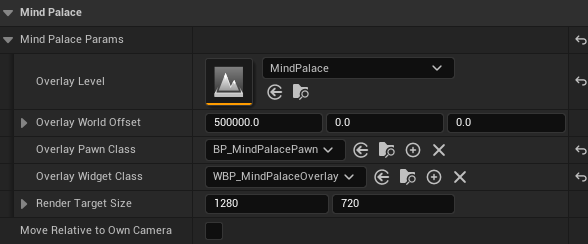
FMindPalaceOpenParams lives on the character so designers can tune it per pawn:
| Field | Purpose |
|---|---|
OverlayLevel |
The palace level streamed in alongside the current one. |
OverlayWorldOffset |
Where the palace instance is placed, default (500000, 0, 0), far enough that neither level appears in the other's view. |
OverlayPawnClass |
The pawn the player controls inside the palace. |
OverlayWidgetClass |
The overlay widget. Its Blueprint names its image PalaceImage and sizes it to fill the viewport. |
RenderTargetSize |
Fallback capture size when the viewport size cannot be read. |
Lifecycle
Preload. At BeginPlay the character calls PreloadMindPalace. The palace streams in hidden at OverlayWorldOffset, spawns its pawn at the level's PlayerStart with a scene capture, and goes dormant: every palace actor hidden and frozen. It stays loaded until the world ends, so opening never waits on streaming. An open that arrives before the preload finishes waits for it.
Unlock. ToggleMindPalace opens nothing until the palace is unlocked. The player unlocks it by activating an ARuneUnlockItem whose Feature is Mind Palace; the unlock is kept in the checkpoint save. Mind Palace Starts Unlocked on the player character is a personal-prototype shortcut for a map that has no item. Closing an open palace is never gated. IsMindPalaceUnlocked on the character reports the result. See Rune actors and placement.
Open. The character's ToggleMindPalaceAction calls ToggleMindPalace. Opening:
- starts the camera view redirect, so the palace level's own camera zones drive the capture;
- wakes the palace, places the palace pawn at its spawn, and refreshes pedestals and rune stars from the save;
- possesses the palace pawn for input while keeping the player's view on whatever camera it was on;
- freezes every actor in the main level;
- sizes the render target to the viewport and adds the widget;
- on the next tick, swaps the main level's sky, fog, and sun for the palace's, starts the capture, shows the widget, and stops rendering the main view underneath.
OnMindPalaceOpened fires when the open completes.
Camera. Each tick, after the camera subsystem resolves the palace's view, TickOverlayCamera moves the capture onto that camera, easing between targets over the blend time the decision asked for. The palace pawn's own camera is the fallback.
Close. Toggling again reverses every step in one tick: the main view renders again, the environments swap back, the main level unfreezes, any pedestal focus or star view is released, the main pawn is repossessed with its view target, the redirect ends, the capture stops, the widget is removed, and the palace goes dormant for the next visit. OnMindPalaceClosed fires.
Freezing. The main level is frozen per actor: custom time dilation, actor and component ticks, playing audio, and simulating bodies with their velocities, all restored exactly on close. The player controller, camera manager, HUD, game mode, game state, world settings, and anything the controller owns keep running, so view and input survive. World timers and Blueprint latent actions owned by main-level actors keep running, because per-actor freezing cannot reach world-scoped systems.
Pedestals and the star view
APedestalActor commemorates one rune through RuneData. It stays hidden and uncollidable until the save marks that rune discovered; the subsystem calls RefreshDiscovery on every open. Interacting pushes its FocusCamera onto the camera subsystem's cinematic stack and locks the player's movement; interacting again returns control. While focused, the plaque plays the rune's looping first-use clip through its recording widget; unfocused, it holds the clip's first frame as a thumbnail. RuneMesh shows the rune's RuneVisualMesh on the front face.
ARuneStarField is the star view. Toggling it pushes its SkyCamera onto the cinematic stack, and the player steps a highlight between the level's ARuneStarActor glyphs from the keyboard, or hovers and clicks one with the mouse. Confirming a star teleports the player to that star's pedestal while the view is still on the sky, then snaps the camera zones to the new spot, so the blend back down lands where walking there would have. A star follows its pedestal's discovery rule. One star field per level.
Rune knowledge
Rune knowledge is part of the checkpoint save, in URephrasedSaveGame::Knowledge (FRuneKnowledgeSaveData):
Entries: per rune,bDiscoveredandFirstUseRecordingId, the clip of its first successful use.UnlockedDrawingPatterns: every rune whose pattern the player has drawn by hand.bHasVisitedPalaceandbHasUsedWorldOrb.
URephrasedSaveSubsystem exposes it: DiscoverRune, IsRuneDiscovered, MarkRuneUsed, HasUsedRune, GetRecordingForRune, UnlockDrawingPattern, IsDrawingPatternUnlocked, GetUnlockedDrawingPatterns, HasUsedWorldOrb, SetHasUsedWorldOrb, IsDrawingUnlocked, SetDrawingUnlocked, IsMindPalaceUnlocked, and SetMindPalaceUnlocked. See Save / Load.
Recording support
UGameplayRecorderSubsystem, UGameplayRecordingSave, and UGameplayRecordingWidget implement the clip pipeline that fills the plaques; a pedestal's plaque hosts the recording widget and plays while focused. See Gameplay recording.
Design-owned palace pieces
The remaining pieces for the palace level and UI work are:
- The thought bubble transition on open and close; the overlay widget is where it plugs in.
- Room unlock state, force field shatter, and room color.
- The settings room displays and directional adjustments, and opening straight into it.
- The spawn rules for returning players and newly seen runes.
- Sol's palace appearance.
Room unlock state and settings values join FRuneKnowledgeSaveData when they need to persist.
Open questions
- The Sept 17 faculty review notes that a 3D space raises the cognitive cost of information retrieval relative to a flat reference. The Sprint 4 playable prototype tests whether the Mind Palace is usable enough to justify that cost.
Sources
- Mind Palace Doc (Sept 10) - https://docs.google.com/document/d/1SJmAOAfufwu9qbgOUCZI1GF3yFlYUOLtF2s-FMq7W0w/edit - covers the Mind Palace layout, entry and exit, pedestals, rooms, traversal, settings room, spawn rules, and Sol's appearance.
- Game Macro Readme (Sept 14) - https://docs.google.com/document/d/1jRoG3rh8M5DEidrQniFXRdLackFVMxQL1ucI89juT-s/edit - covers the notebook role and the review-by-footage rule.
- Faculty Review Sept 17 - https://docs.google.com/presentation/d/1wnzTXn6ZQJLPPdZ2ruGYgHKCGgU6m4gE_gk341jtXBc/edit - raises the cognitive cost question for the 3D memory space.
Change history
- 2026-10-11 — Gabriel Li — Documented the Mind Palace unlock: the start-unlocked setting, the unlock item, and the saved flag (CORE-013).
- 2026-10-02 — Gabriel Li — Added a screenshot of the Mind Palace Params on the player character Blueprint (CORE-011).
- 2026-09-29 — Gabriel Li — Rewrote the engineering surface for the streamed overlay:
UMindPalaceSubsystem, the camera view redirect, pedestals, the star view, rune knowledge in the checkpoint save, and the thought bubble. - 2026-09-17 — Gabriel Li — Rewrote the page as the Mind Palace feature specification and aligned the engineering surface with the live AMemoryOrb and UPlayerRuneKnowledge code.
- 2026-09-10 — rsafadi — Documented
RuneRecordingMap(first-use clip per rune). - 2026-05-08 — Gabriel Li — Added baseline change history section for weekly wiki maintenance.