Mind drawing
Mind Drawing is how the player draws a rune. Opening it spawns a walked draw floor at the player's feet inside a darkened sphere, and the character is the pen: the player picks a path out of the socket they stand on, rides it to lay ink, and submits the finished shape. A shape that matches an authored pattern becomes a drawn word and feeds the same Verb + Noun transaction as a world rune.
This page describes the draw floor, its session flow and controls, the popup tablet a coordinator uses when it has no floor class, the presentation of drawn words, and the authoring tool. For the step-by-step task of adding a new pattern, use Making runes. For the design rules behind a rune's shape, use Rune language.
Where it sits in the pipeline
player opens Mind Drawing
              |
              v
ARuneDrawFloor  (pawn rides strokes, ink on the floor)
              |
              v  submit
ARuneDrawFloor::FindMatchAtAnyTurn  (FloorPatterns on DA_RuneDrawingGraph)
              |
              v
drawn word -> URuneCoordinatorComponent::SubmitDrawnRune
              |
              v
stored on the rune orbital, or played -> FRuneTransaction
Drawing only produces a word. Delivery to puzzle objects is owned by the coordinator and the effect components; see Rune system core.
The draw floor
ARuneDrawFloor is spawned by the coordinator when DrawFloorClass is set, which is how
BP_RephraseCharacter1 draws (BP_RuneDrawFloor). The floor builds its stroke table in code, so the
geometry is identical on every machine.
- Node 0 is the center and nodes 1-8 are the rim points N, NE, E, SE, S, SW, W, NW.
- The table holds 36 strokes: 8 spokes, 8 head circles in two halves each, 8 rim arcs, and 4 inward arcs between the cardinal points.
- The rim and the inward arcs are always on the floor. The body is a head spoke carrying its head circle plus two leg spokes. It turns as one piece in 45 degree steps, so only the body strokes of the current turn are on the floor. Upright, the head points north and the legs point south-east and south-west.
On a controller the left stick points at a path. PickAimedOption keeps the paths in their order round the
socket and gives each an equal wedge of the circle, laid as close to the paths' own directions as their
spacing allows, so two paths that leave only a few degrees apart are still easy to tell apart. The stick is
read the way the floor looks on screen, it has to pass AimDeadzone (0.65), and the current path holds until
the stick is 10 degrees past its wedge edge. On a keyboard, A and D step through the paths at the socket.
A Draw press (W, or Xbox A) draws the selected stroke end to end in TapStrokeSeconds (0.1 s) and stops
at the socket it reaches; holding it draws nothing more. With LB or RB already held, Xbox A turns the base
instead and draws nothing. Undo held during a stroke pulls the pen back along it; let go and the pen
finishes the retreat at ReleasedSpeedScale of that speed.
After the game window regains focus or a controller connects or disconnects, drawing presses wait until every drawing input has been released, so a button or stick held through the change does nothing.
Socket movement
Socket movement takes the pen to another socket without ink. The pen slides there in
SocketMoveSeconds (0.1 s), and the ink, the undo history, and the base's turn stay as they are. On
arrival the path that leaves nearest to straight up the screen is selected. A move asked for while the
pen or the base is moving is dropped.
The nine sockets form a 3 x 3 layout on screen: the rim points N, NE, E, SE, S, SW, W, NW around the center, with north up. Turning the base moves only the body strokes, so the layout stays the same at every turn. The keyboard and the controller each have two schemes for playtesting, chosen separately by a console variable or the matching row of the pause menu's Debug panel.
Keyboard, Rephrased.Drawing.SocketControls. While Shift is held, each socket key's letter lies on the
floor just outside the socket it leads to (SocketHintOffset, SocketHintHeight, SocketHintSize):
| Scheme | Value | Keys | Behavior |
|---|---|---|---|
| Drawing A | 0 | Shift + W / A / S / D | One socket up, left, down, or right. Each step stops at the edge of the layout, so a corner reaches the center in two steps. |
| Drawing B | 1 | Shift + Q W E / A S D / Z X C | Straight to the socket in the key's place in the block: Q is NW, S is the center, C is SE. The current socket's key leaves the pen where it is; its letter shows dimmed. |
Controller, Rephrased.Drawing.ControllerSocketControls. A stick tilt counts at SocketStickEnter
(0.4) and the stick is back in neutral at SocketStickExit (0.28):
| Scheme | Value | Input | Behavior |
|---|---|---|---|
| Controller A | 0 | Right stick | One hop from the current socket in the tilt's screen direction, eight ways. Each axis stops at the edge of the layout. The stick returns to neutral before the next hop, and LT has no action. |
| Controller B | 1 | LT held + left stick | A fresh LT press with the stick neutral goes to the center. While LT stays held, each new direction goes straight to that outer socket; a steady direction picks once, and neutral keeps the pen where it is. Releasing LT gives the left stick back to path selection once it has returned to neutral. The right stick has no action. |
ARuneDrawFloor::ResolveSocketKey holds the keyboard rules and FRuneControllerSockets the controller
rules; the tests check both.
Framing
While Mind Drawing is open the view is the floor's DrawingCamera, straight above with the floor's
north up the screen. The floor pushes it onto the camera subsystem's cinematic stack when it opens and
blends back over DomainGrowSeconds when it closes. On BP_RuneDrawFloor the camera frames the floor
and the player centre-left, and the stored runes orbit beyond the upper-right rim, clear of the
character, the sockets, and the strokes. OrbitalBearing (degrees clockwise from the floor's north),
OrbitalPastEdge, and OrbitalHeight place the runes; moving the DrawingCamera component adjusts the
framing.
Patterns
Floor shapes live in the Patterns list on DA_RuneDrawingGraph (FloorPatterns in C++). Matching
runs only on submit. It is exact and order-independent: the drawn set must equal the pattern's set,
and any extra stroke prevents a match. A drawing turned about the center counts as the same word, so
FindMatchAtAnyTurn tries every 45 degree turn of the whole drawing.
Session flow
- Unlock. Drawing is gated by an
ARuneUnlockItemwhose Feature isDrawing. The player activates it like a world rune; it callsUnlockDrawing(), shows its text tutorial, and disables itself.UnlockDrawing()records the unlock in the checkpoint save, and the coordinator reads it back atBeginPlay.bDrawingStartsUnlockedon the coordinator is a personal-prototype shortcut for a map that has no item. See Rune actors and placement. - Open.
OpenDrawing()returns false and does nothing while a command orb is active or Mind Drawing is already open. It spawns the floor facing the way the camera looks, lifts the pawn onto it, blends the view to the floor's camera straight above, grows the domain sphere, and addsIMC_RuneDrawing. The rune orbital closes, and the stored runes orbit beyond the floor's upper-right rim on three nested paths, newest inside. - Draw. The player picks an outgoing path and draws it with one press of Draw. Socket movement takes the pen to another socket without ink. Undo reverses the stroke in progress, or takes back the last finished stroke when the pen is at rest.
- Submit. A recognized shape clears from the floor and goes to the coordinator, which stores it
on the rune orbital (
bStoreDrawnRunes) or plays it. An unrecognized shape stays on the floor and blinks inRejectColorthree times. - Close.
CloseDrawing()returns the pawn to where it opened the floor, blends the view back to the game camera, collapses the domain, and destroys the floor. The stored runes gather round the player and the orbital shows itself until inactivity puts it away.
Controls
| Control | Keyboard | Controller (Xbox names) | Notes |
|---|---|---|---|
| Open and close Mind Drawing | E |
Y | IA_ToggleDrawing in IMC_Default |
| Choose a path | A / D |
Left stick (point) | A and D step to the previous and next path at the socket. Each path owns an equal slice of the circle round the stick, so four paths sit roughly up, right, down, and left; letting go keeps the choice |
| Draw the selected path | W |
A | One press draws the whole stroke in 0.1 s and stops at its end |
| Move to another socket | Shift + key |
Right stick (Controller A) or LT + left stick (Controller B) | Drawing A: W / A / S / D. Drawing B: Q W E / A S D / Z X C. See Socket movement |
| Show socket keys | Shift (held) |
— | Letters on the floor at each destination |
| Reverse the stroke / undo | S |
X | Hold to reverse the stroke in progress; a press at rest undoes the last finished stroke |
| Submit | F |
B | |
| Turn the body 45 degrees | Ctrl + A / D |
LB or RB held, then A | Counter-clockwise / clockwise, only on an empty base at rest. A draws nothing while a bumper is held |
Shift and Ctrl each work on their own; a socket key or a turn pressed with both held has no action. Both
bumpers held with A has no action. The Xbox names are the Gamepad_* keys Unreal reads from any
controller: A is Gamepad_FaceButton_Bottom (Cross on a DualSense), B Gamepad_FaceButton_Right
(Circle), X Gamepad_FaceButton_Left (Square), Y Gamepad_FaceButton_Top (Triangle). RT and the D-pad
have no drawing action.
Input setup
IMC_Default carries movement, interaction, and the Mind Drawing toggle. IMC_RuneDrawing is added
at a higher priority while Mind Drawing is open and removed when it closes, so drawing input cannot
leak into normal movement, and its rows shadow the same keys in IMC_Default (A, B, F, W, A,
S, D).
Physical keys live only in the input assets.
BP_RuneDrawFloor binds the floor actions:
| Floor property | Action | Rows in IMC_RuneDrawing |
|---|---|---|
SelectPathAction |
IA_CycleRuneStrokes |
A, D (Pressed) |
AimPathAction |
IA_RuneDrawAim |
Left stick |
TapDrawAction |
IA_RuneDrawTapStroke |
W, A |
SocketStickAction |
IA_RuneDrawSocketStick (Axis2D) |
Right stick |
SocketTriggerAction |
IA_RuneDrawSocketTrigger |
LT |
SocketModifierAction |
IA_RuneDrawSocketModifier |
Left Shift, Right Shift |
SocketKeyActions (nine, Q to C in reading order) |
IA_RuneDrawSocketQ ... IA_RuneDrawSocketC |
Q, W, E, A, S, D, Z, X, C, each chorded on IA_RuneDrawSocketModifier |
RotateModifierAction |
IA_RuneDrawRotateModifier |
Left Ctrl, Right Ctrl |
RotateBaseAction |
IA_RuneDrawRotateBase (Axis1D) |
A (negated), D, chorded on IA_RuneDrawRotateModifier |
UndoAction |
IA_RuneDrawUndo |
S, X |
SubmitAction |
IA_RuneDrawSubmit |
F, B |
TurnLeftAction / TurnRightAction |
IA_RuneDrawTurnLeft / IA_RuneDrawTurnRight |
LB / RB |
Each socket key is its own action, so a key pressed while another is still held reads as its own
press. The chords block the plain rows on the same keys while they fire, so Shift + W moves the pen
instead of drawing, Shift + E keeps Mind Drawing open, and Ctrl + A turns the base instead of
choosing a path. F and B in IMC_RuneDrawing sit above Interact in IMC_Default, so they only
submit. The floor reads LB and RB as held flags, so A pressed after a bumper turns the base.
The coordinator binds IA_ToggleDrawing (E, Y) to open and close Mind Drawing.
The rune orbital opens only outside Mind Drawing. Its open keys (Q, X) sit in a context above
IMC_RuneDrawing, and the orbital removes that context while Mind Drawing is open and adds it back when
it closes, so inside Mind Drawing X is Undo and Shift + Q reaches the northwest socket.
ERuneInputModeRestore decides which input mode the controller returns to when Mind Drawing closes
(GameOnly, GameAndUI, UIOnly) and whether the saved focus widget is restored. The policy is
authored explicitly and is never inferred from cursor or click state.
Popup tablet
A coordinator with no DrawFloorClass opens URuneDrawingWidget, a popup tablet, instead. The
player walks a 21-stroke graph with the highlight, toggles strokes on and off, and the active set is
matched against the tablet's own patterns on every change.
The 21-stroke graph
URuneDrawingDataAsset generates the tablet geometry in code, so the stroke table is identical on
every machine and cannot drift between assets. StrokeCount is 21 and is the single source of
truth for the tablet size.
Circles and lines share one ID space. A pattern mixes both freely.
| Group | IDs | Placement |
|---|---|---|
| Circles | C01–C05 |
Center, North, East, South, West |
| Center spokes | L01–L04 |
North–Center, Center–East, Center–South, West–Center |
| Inner diamond | L05–L08 |
North–West, North–East, East–South, South–West |
| Outer square | L09–L16 |
Eight segments around the rim, corner to corner |
Positions are authored in normalized board space around the center at (0.50, 0.50), so the board
scales to any widget size without re-authoring geometry.
Every stroke carries a neighbor table (UpId, DownId, LeftId, RightId). Navigation walks
that table rather than reading screen geometry, which is what makes keyboard and stick input
produce the same path.
Tablet patterns
Tablet shapes live in the Legacy Patterns list on DA_RuneDrawingGraph (Patterns in C++).
Matching is exact and order-independent: the active set must equal the pattern's set. Any extra
active stroke prevents a match.
| Word | Type | Strokes |
|---|---|---|
| Open | Verb | L01 L02 L03 L04 |
| Repair | Verb | L05 L06 L07 L08 |
| Light | Noun | C02 L01 L05 L06 |
| Door | Noun | C03 L09 L10 L11 L12 L13 L14 L15 L16 |
The sets are also exposed as static helpers (OpenStrokeIds, LightStrokeIds, RepairStrokeIds,
DoorStrokeIds) used by tests and by the authoring tool.
ValidateStrokePatterns reports the four ways an authored set can be wrong: no rune assigned, no
stroke IDs, a stroke ID that is not on the tablet or is listed twice, and a set that duplicates
another pattern. Two words that share a stroke set can never be distinguished, so validation
rejects the second one.
Tablet flow
Movement steps the highlight through the neighbor table; the toggle action (Space) adds or removes
the highlighted stroke. Matching runs automatically on every change, with no separate confirm step;
ConfirmDrawing() exists so callers and tests can count a confirm request. A matched word parks and
the board clears so the player can draw the second word. GetParkedDrawnStrokeIds() returns the
parked shape, and a read-only preview widget is placed beside the live panel. Drawing the same
parked word again cancels it. An unmatched confirm raises OnDrawingInvalidConfirmed and plays the
reject feedback. While the panel is open the mouse cursor is hidden, and mouse movement and clicks
do nothing on the tablet or in the game.
The widget
URuneDrawingWidget is a UUserWidget that renders and drives the board. The C++ widget paints
the tablet, strokes, sparks, and confirm bar directly, so the panel works before any Blueprint
styling exists; WBP_RuneDrawing subclasses it for production presentation.
Layout is designer-authored. PopupSize, ViewportAnchor, and ViewportAlignment are applied
together through MakeViewportSlot, because SetDesiredSizeInViewport cannot be called after
SetAnchorsInViewport without resetting the anchor to the top left.
| Area | Fields |
|---|---|
| Board geometry | BoardPadding, NodeRadius, SegmentHitTolerance, DestinationRadius |
| Stroke style | InactiveLineThickness, ActiveLineThickness, BackgroundColor, NodeColor, InactiveSegmentColor, ActiveSegmentColor, MatchedStrokeColor |
| Parked preview | ParkedPreviewSize, ParkedPreviewGap |
| Confirm bar | ConfirmButtonSize, ConfirmButtonGap, ConfirmButtonLabel, ConfirmButtonColor, ConfirmButtonTextColor |
A matched board turns to MatchedStrokeColor. ComputeContrastRatio exposes the WCAG relative
luminance calculation so authored colors can be checked against the native defaults, which are
opaque and contrast-tested.
ConfirmButton and CopyPatternButton are optional bindings. A Blueprint that supplies
ConfirmButton gets a native confirm control; HasConfirmControl() reports whether one is
present. A press on the board reports Ignored, ConfirmHandled, or PrimitiveToggled, so a
Blueprint can distinguish a consumed confirmation from a toggled stroke.
Blueprint hooks: BP_OnDrawingChanged, BP_OnInvalidDrawingConfirmed,
BP_OnPatternPayloadCopied.
The widget is also usable read-only. InitAsPreview paints a parked pattern without accepting
input, and preview instances are never reused as the live panel.
Authoring tool
The tablet widget ships an authoring mode for turning a shape into StrokeIds without hand-counting the
graph.
- Set
bAuthoringModeand assignAuthoringRuneon the widget. - Draw the intended shape on the board.
- Use the copy control, or call
CopyAuthoringPatternPayload(). - Paste the payload into the rune's
Legacy Patternsentry onDA_RuneDrawingGraph.
A pattern can also be edited straight on the data asset. Each Legacy Patterns entry on DA_RuneDrawingGraph shows its Rune and a Pattern picker of the stroke graph in the Details panel; clicking a stroke adds it to or removes it from the entry's StrokeIds.
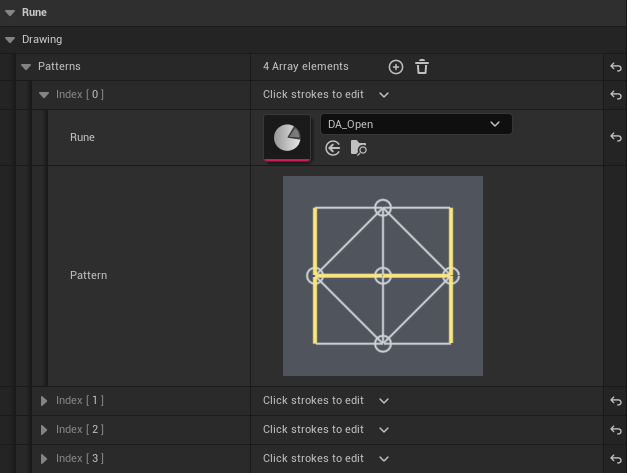
BuildPatternPayload is static and deterministic, and builds the payload with the stroke IDs
sorted. It never writes to the data asset, so the tool cannot corrupt a pattern set while it is
being used. BP_OnPatternPayloadCopied reports success and the payload to a Blueprint.
FRunePattern stores StrokeIds. The SegmentIds and FilledNodeIds fields are marked
deprecated with replacement messages and should not be used in new work — circles are strokes and
use the same ID space.
Presentation
UDrawnRunePresentationComponent shows the sentence the player drew, above the character's head.
It has two slots: one word centres overhead, two words split left and right. It uses each rune's
own RuneVisualMesh, so a drawn word looks like the rune it represents.
| Field | Purpose |
|---|---|
OverheadHeight |
Height above the character |
WordSpread |
Separation between the two slots |
WordScale |
Size of each word mesh |
Only the Drawn origin reaches this component. World runes keep their own in-place visuals, so a
world word never duplicates overhead.
A drawn sentence stays visible until the command orb finishes. SetRejectBlinkLit hides and
restores the slots for grammar-reject feedback, which is how a rejected pair reads as "nothing
happened" rather than a broken word.
Tests
Shared behavior is covered by Rephrased.Rune.PROT001 in
Source/Rephrased/RuneSystem/Tests/PROT-001/. The drawing and drawn-presentation tests are:
Rephrased.Rune.PROT001.Drawing.Topology.TwentyOneStrokeTabletRephrased.Rune.PROT001.Drawing.PatternValidation.RejectsInvalidAuthoredSetsRephrased.Rune.PROT001.Drawing.PatternMatching.ExactUnorderedOnlyRephrased.Rune.PROT001.Drawing.Highlight.ToggleAndNavigateRephrased.Rune.PROT001.Drawing.Coordinator.AutoMatchActivatesWithoutConfirmRephrased.Rune.PROT001.Drawing.Coordinator.ParkedWordAllowsSecondRuneRephrased.Rune.PROT001.Drawing.Coordinator.ConfirmDoesNotCloseRephrased.Rune.PROT001.Drawing.Widget.NavigateAndToggleKeysRephrased.Rune.PROT001.Drawing.Widget.NativeStyleDefaultsAreOpaqueAndContrastingRephrased.Rune.PROT001.Drawing.Widget.ViewportSlotKeepsCenterAnchorRephrased.Rune.PROT001.Drawing.Authoring.NormalizedPayloadRephrased.Rune.PROT001.Drawing.InputMode.ExplicitRestorePolicyRephrased.Rune.PROT001.Drawing.BlueprintSurfaceRephrased.Rune.PROT001.Presentation.SlotLayout.SingleCentredTwoSplitRephrased.Rune.PROT001.Presentation.PendingDrawnWordShowsAndClearsRephrased.Rune.PROT001.Presentation.DrawnSentenceConsumesAndClearsRephrased.Rune.PROT001.Presentation.DrawnSentencePersistsUntilWaveCompletionRephrased.Rune.PROT001.Presentation.DrawingWindowWaitsForTheCommandWave
The draw floor is covered by Rephrased.Rune.PROT003.DrawFloor:
Rephrased.Rune.PROT003.DrawFloor.Topology.StrokeTableOnNineNodesRephrased.Rune.PROT003.DrawFloor.BodyTurn.SeventeenStrokesEveryStepRephrased.Rune.PROT003.DrawFloor.PatternMatching.ExactUnorderedOnlyRephrased.Rune.PROT003.DrawFloor.PatternMatching.TurnedDrawingIsTheSameWordRephrased.Rune.PROT003.DrawFloor.DesignShapes.DrawableAndDistinctRephrased.Rune.PROT003.DrawFloor.Aim.EqualWedgePerPathRephrased.Rune.PROT003.DrawFloor.Sockets.DrawingAStepsAndStopsAtEdgesRephrased.Rune.PROT003.DrawFloor.Sockets.DrawingBKeysNameSocketsRephrased.Rune.PROT003.DrawFloor.Controller.ARightStickHopsAndRearmsAtNeutralRephrased.Rune.PROT003.DrawFloor.Controller.BTriggerPicksSocketsRephrased.Rune.PROT003.DrawFloor.Controller.BumperAndATurnsWithoutDrawing
Controller feel on the floor, widget styling, and Blueprint layout still need human PIE evidence.
Source files
Source/Rephrased/RuneSystem/Drawing/RuneDrawFloor.*Source/Rephrased/RuneSystem/Drawing/RuneDrawingDataAsset.*Source/Rephrased/RuneSystem/Drawing/RuneDrawingState.*Source/Rephrased/RuneSystem/Drawing/RuneDrawingWidget.*Source/Rephrased/RuneSystem/Drawing/DrawnRunePresentationComponent.*Source/Rephrased/RuneSystem/Activation/RuneUnlockItem.*Source/Rephrased/RuneSystem/Activation/RuneCoordinatorComponent.*
Shared assets
| Asset | Path |
|---|---|
| Draw floor | Content/Rephrased/Gameplay/Runes/Drawing/BP_RuneDrawFloor |
| Drawing graph and patterns | Content/Rephrased/Gameplay/Runes/Drawing/DA_RuneDrawingGraph |
| Drawing widget | Content/Rephrased/UI/WBP_RuneDrawing |
| Input actions and contexts | Content/Rephrased/Input/ |
Related pages
- Making runes — the authoring recipe for adding a pattern.
- Rune language — shape rules for verbs and nouns.
- Rune system core — transaction, command orb, and effect delivery.
- UI and menus — widget conventions and menu flow.
- Data assets — data-asset conventions.
Change history
- 2026-10-19 — Gabriel Li — Documented the keyboard controls (tap W, Shift socket movement with Drawing A and B, Ctrl + A / D base turn, F submit), the socket key letters, the controller controls (A draw, B submit, X undo, LB / RB + A turn, Controller A right-stick hops and Controller B LT socket picks), and the fixed top-down framing with the stored runes beyond the upper-right rim (TA-001).
- 2026-10-15 — Gabriel Li — Rewrote the page around the walked draw floor and documented its keyboard and PS5 controls: left stick points to a path with an equal wedge per path, L2 draw, R2 erase, Circle reverse and undo, Triangle hold to pause and tap to close, Square submit (PROT-3).
- 2026-10-11 — Gabriel Li — The drawing unlock comes from
ARuneUnlockItemand is kept in the checkpoint save (CORE-013). - 2026-10-02 — Gabriel Li — Documented editing a pattern's strokes on the data asset, with a screenshot, and the tablet's keyboard and gamepad only input (CORE-011).
- 2026-09-29 — Gabriel Li — Updated the drawing graph path (CORE-009).
- 2026-09-17 — Gabriel Li — Added the Mind Drawing system reference: the 21-stroke graph, shipped pattern sets, session flow, widget and input surface, drawn presentation, and the authoring tool.