Adding a noun
A noun is a rune word with WordType set to NOUN. It names the objects a command can affect and holds that object's row of the effects matrix. Creating one is the rune recipe with the noun's Rules filled in; this page covers those rules and the puzzle that answers to the noun.
Start from the noun's row in Current Rune Type. Its states and supported verbs come from there.
Word fields
Create a RuneDataAsset in Content/Rephrased/Gameplay/Runes/Nouns/ and set:
| Field | Purpose |
|---|---|
RuneWord |
Player-facing word. Match the rune matrix exactly. |
EnglishDefinition |
Definition shown under the word above its world rune while the G definitions toggle is on. |
WordType |
NOUN. |
RuneVisualMesh |
Rune mesh shown on the word's pedestal, as the drawn rune, and on a world rune whose Visual has no mesh of its own. |
Rules
Setting WordType to NOUN reveals the Rules category:
| Field | Purpose |
|---|---|
| Default Status | The state a placed object starts in, e.g. Closed for a Door. |
| Rules | One row per matrix cell: Verb, From Status, To Status, Stops Motion. |
| Temporary Rules | Cells that last a while, such as Rise: Verb and From Status. |
| States | Read-only list of every state the rules use. |
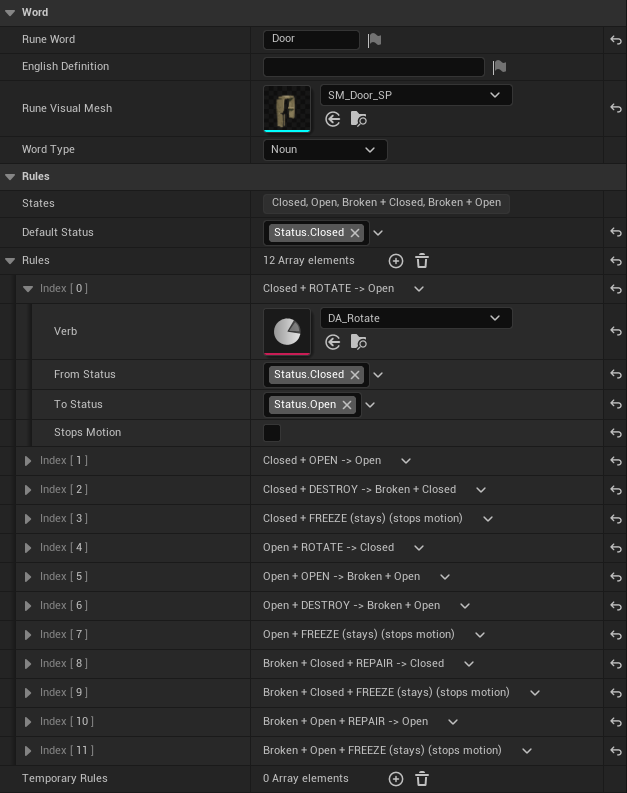
Every state has its own tag, including the default one, and a combined state is a tag combination. The Door, for example:
| State | Open | Rotate | Destroy | Repair | Freeze |
|---|---|---|---|---|---|
| Closed | -> Open | -> Open | -> Broken + Closed | stays, stops motion | |
| Open | -> Broken + Open | -> Closed | -> Broken + Open | stays, stops motion | |
| Broken + Closed | -> Closed | stays, stops motion | |||
| Broken + Open | -> Open | stays, stops motion |
An empty cell has no row, so that command rejects with feedback. Data validation reports two rows for the same cell. The status tags are listed in the Rune status catalog.
Pair the noun with a puzzle
The noun's objects are puzzle devices: Blueprint children of ARunePuzzleActor in Content/Rephrased/Gameplay/PuzzleDevices/. On the puzzle Blueprint:
- Set Noun on
RuneableObjectto the new noun. - Add a State Looks row for every state in the noun's States list.
- Add the Performances its cells call for.
- Add a component to the Blueprint for each part the looks and performances use, such as
Bulb, and pick it by name as a Target.
A placed puzzle leaves Status empty to start in Default Status, or picks one of the noun's states. See Adding a puzzle device.
Current nouns
| Noun | Word data | World rune | Puzzle |
|---|---|---|---|
| Book | DA_Book |
BP_RuneWord_Book |
|
| Box | DA_Box |
BP_RuneWord_Box |
BP_Puzzle_Box |
| Character | DA_Character |
BP_RuneWord_Character |
|
| Column | DA_Column |
BP_RuneWord_Column |
BP_Puzzle_Column |
| Door | DA_Door |
BP_RuneWord_Door |
BP_Puzzle_Door |
| Fake World | DA_FakeWorld |
BP_RuneWord_FakeWorld |
|
| Fire | DA_Fire |
BP_RuneWord_Fire |
BP_Puzzle_Fire |
| Light | DA_Light |
BP_RuneWord_Light |
BP_Puzzle_Light |
| Mirror | DA_Mirror |
BP_RuneWord_Mirror |
BP_Puzzle_Mirror |
| Mural Wall | DA_MuralWall |
BP_Puzzle_MuralWall |
|
| Sky | DA_Sky |
BP_RuneWord_Sky |
BP_Puzzle_Sky |
| Stair | DA_Stair |
BP_RuneWord_Stair |
BP_Puzzle_Stair, BP_Puzzle_ArchiveStair |
| Tile | DA_Tile |
BP_RuneWord_Tile |
BP_Puzzle_Tile |
| Tree | DA_Tree |
BP_RuneWord_Tree |
BP_Puzzle_Tree |
| True World | DA_TrueWorld |
BP_RuneWord_TrueWorld |
|
| Wall | DA_Wall |
BP_RuneWord_Wall |
BP_Puzzle_Wall |
| Water | DA_Water |
BP_RuneWord_Water |
BP_Puzzle_Water |
| Wind | DA_Wind |
BP_RuneWord_Wind |
BP_Puzzle_Wind |
World runes live in Content/Rephrased/Gameplay/Runes/WorldRunes/.
Verification
- The noun has
WordTypeset toNOUN, a Default Status, and one rule row per supported matrix cell. - Data validation on the noun reports no duplicate cells.
- Its puzzle has a State Looks row for every state, and validation on the puzzle reports no errors.
- A receiver with a different noun ignores the command.
- A cell with no rule rejects without changing state.
Rephrased.Rune.CORE009passes, and PIE inLV_2ndPlayableor the assigned room covers each state.
Source files
Source/Rephrased/RuneDataAsset.h— word fields, rules, Default StatusSource/Rephrased/RuneSystem/Effects/RuneNounRule.h— rule rowsSource/Rephrased/RuneSystem/Effects/RuneableObjectComponent.h— noun identity, status, command entry pointSource/Rephrased/RuneSystem/Effects/RuneStatusTags.h— nativeStatus.*tagsSource/Rephrased/RuneSystem/Tests/CORE-009/RuneNounRuleTests.cpp— rule, state, and look coverage
Change history
- 2026-10-02 — Gabriel Li — Word field descriptions for
EnglishDefinitionandRuneVisualMeshmatch the Rune Data Asset; added editor screenshots (CORE-011). - 2026-10-01 — Gabriel Li — Replaced Linked Actor Slots with Blueprint components (CORE-011).
- 2026-09-29 — Gabriel Li — Rewrote noun authoring around Default Status, rules, and puzzle pairing; listed every current noun (CORE-009).
- 2026-09-17 — Gabriel Li — Added the noun authoring recipe: noun-only data fields, allowed statuses, verb overrides, and receiver pairing.